
7 Days to Die server manager that remembers every blood moon
Pick any survivor on your 7 Days to Die server and replay their blood moon on your world's map: where they fought, which zombies they killed, where they died and what they carried just before. The morning ticket about a lost kit or an emptied storage box starts from that record.
The map uses the tiles your server renders, so map rendering must be on in serverconfig.xml.
- Free for one server, with every module
- Positions, kills, deaths and inventory in one record per player
- The mod runs on the dedicated server. Survivors join with the normal game
Tickets every 7 Days to Die admin knows
"Someone emptied my storage while I was at the trader"
Your PvE rules say hands off other people's bases, but the game keeps no record of who walked into a land claim while the owner was out.
With Takaro Draw a box around the base for the hours they were gone, read who was seen inside, then what those players gained there.
"The horde ate my kit on day 49"
The morning after blood moon brings refund requests. Some are real, some are a full set of steel tools that never existed.
With Takaro Open their inventory at the minute before the death and give back exactly that, by item name, amount and quality. Or don't.
"He walked straight to our hidden base"
A PvP clan says a rival knew where they built. Watching someone invisibly only works while that player is online, and they won't be.
With Takaro Replay that player's trail over the past days and decide from the record. Ban from their profile if it holds up.
Give back what the horde took, and only that
A death on horde night turns into a refund ticket the next morning. (1) On the Tracker, move to the minute before the death and read what the player carried. (2) Open Give Items from their row and add the same things by their real names, with the amount and quality you choose. (3) Press Give items: it goes straight into their inventory, and anything that doesn't fit lands at their feet. Inventory is checked at intervals, so the times are the moments Takaro looked.
How inventory history works →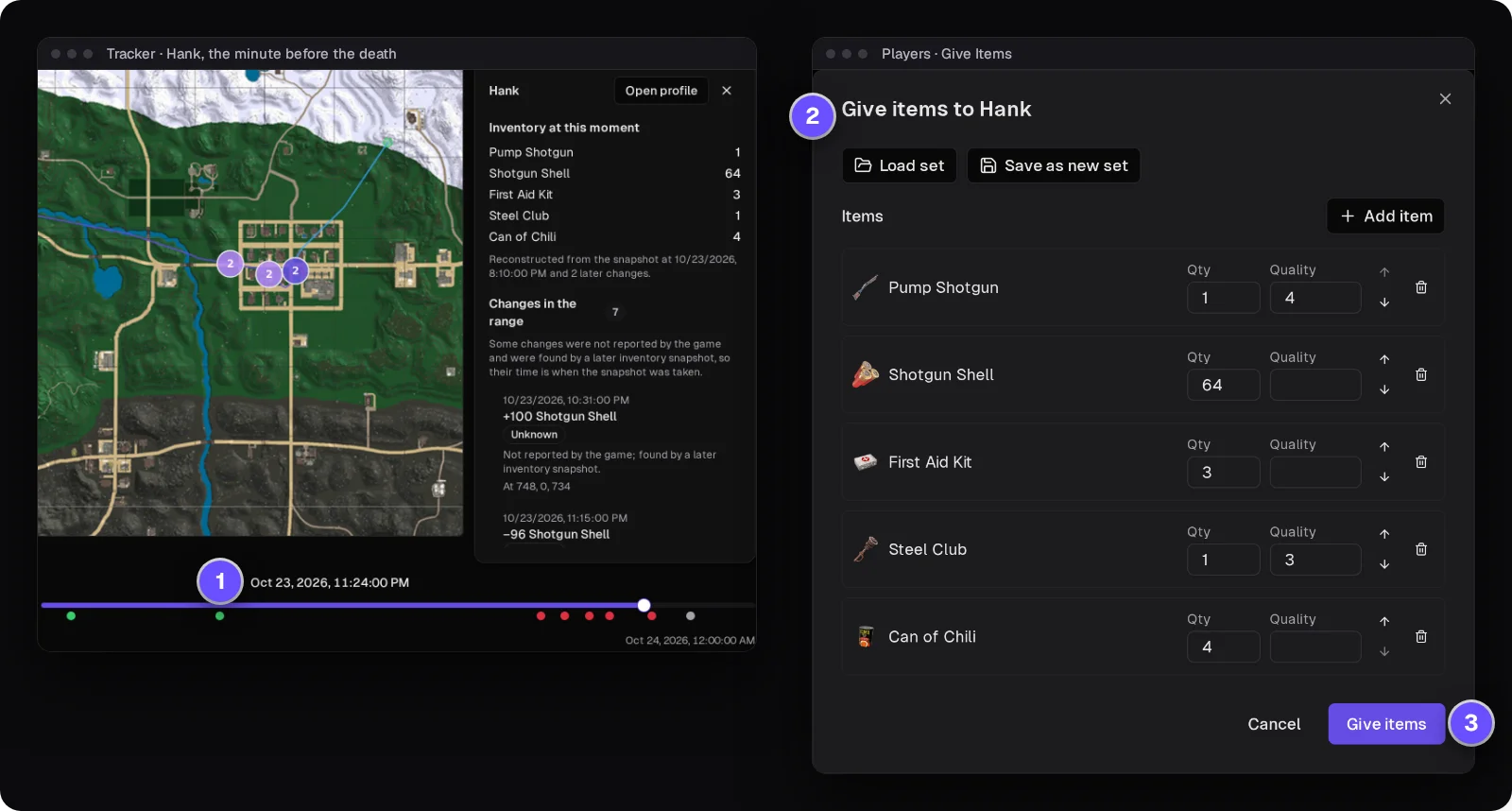
Who was in that base between 2 and 4 AM?
Draw a box around the base on the Tracker, the map's history view, and set the hours. You get every player seen inside with the first and last time, and the Theft tab lists what they gained while in there: Forged Steel, an AK-47, ammo. That's strong evidence, not proof, because the game doesn't say where an item came from, and positions are samples about 30 seconds apart.
How area search and Theft work →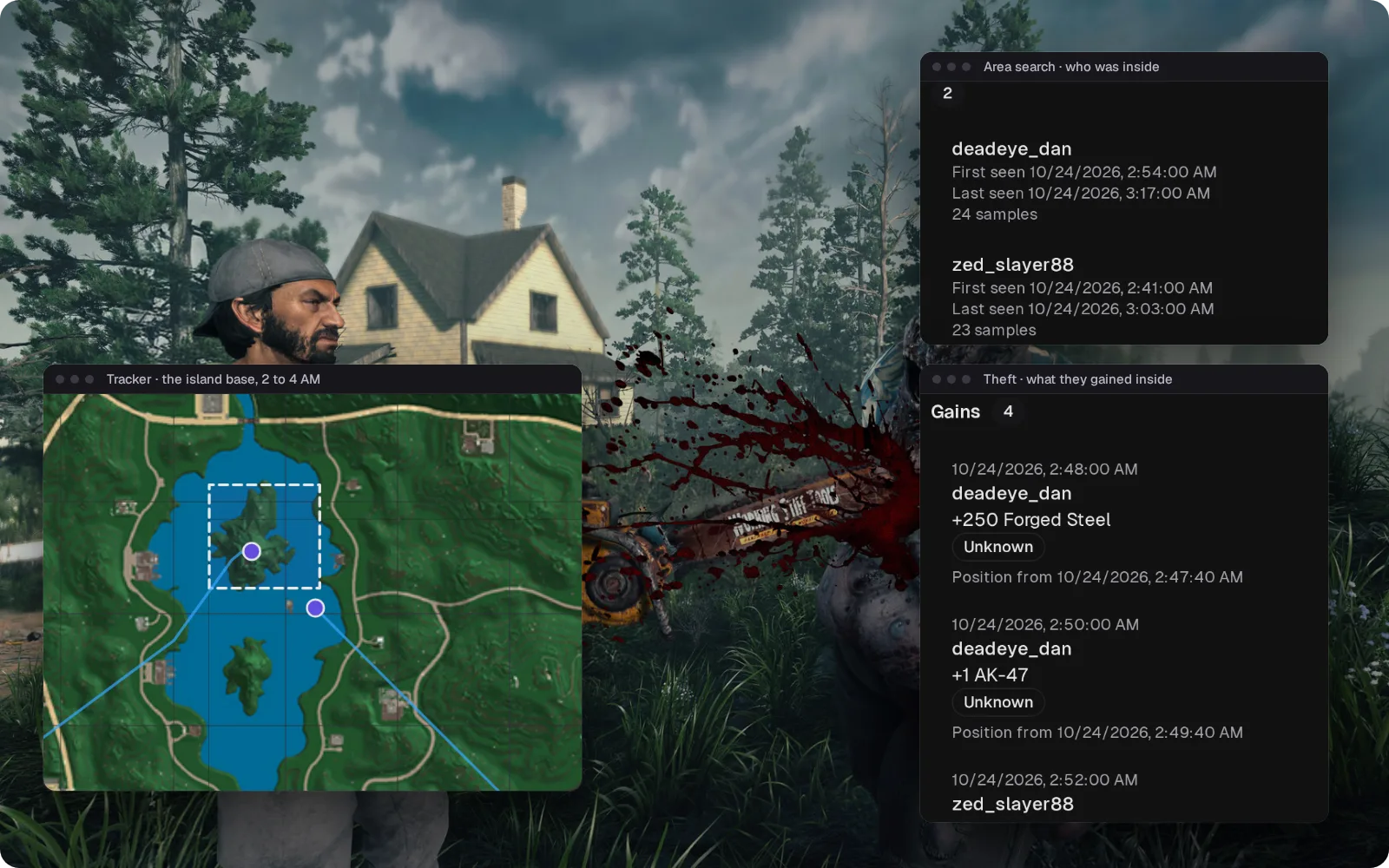
Everything one survivor did on horde night
Filter the server's events to one player and read the night in order: when they joined, what they said, the shells they bought, every Boe, Arlene and Feral Wight they killed, when they died and when they left. It's the first thing to open when their name comes up the next morning.
How the Tracker works →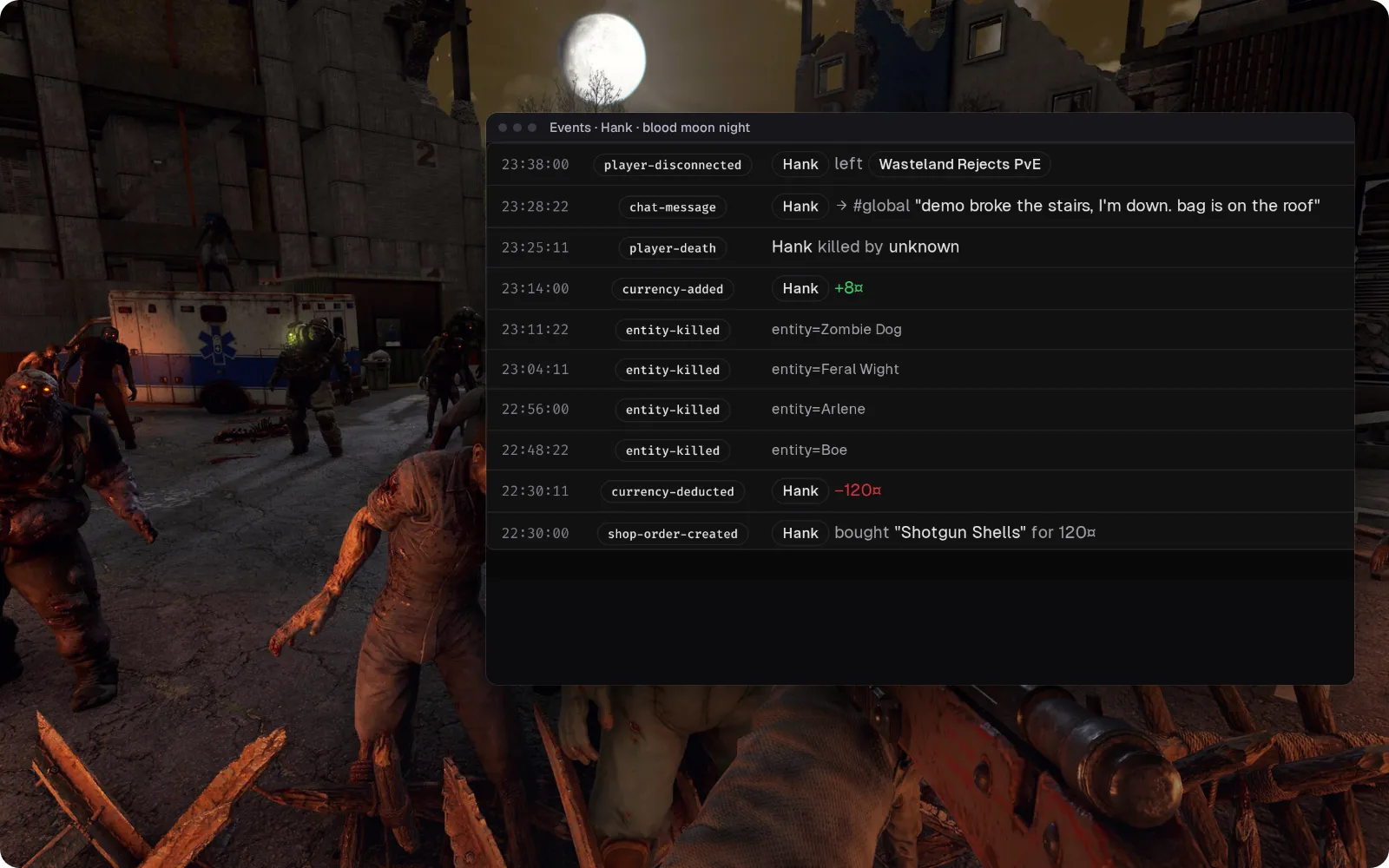
Plan the blood moon from Discord
Horde-night chat lands in the Discord channel of your choice, and staff replies appear in game marked [D]. Joins and leaves are posted too, so "who's at the horde base?" gets an answer before the horde arrives. On the current mod, Takaro's own server messages can appear in the channel more than once, and Discord to game hasn't been re-checked on mod version 3.3.0 yet.
Set up the Discord bridge →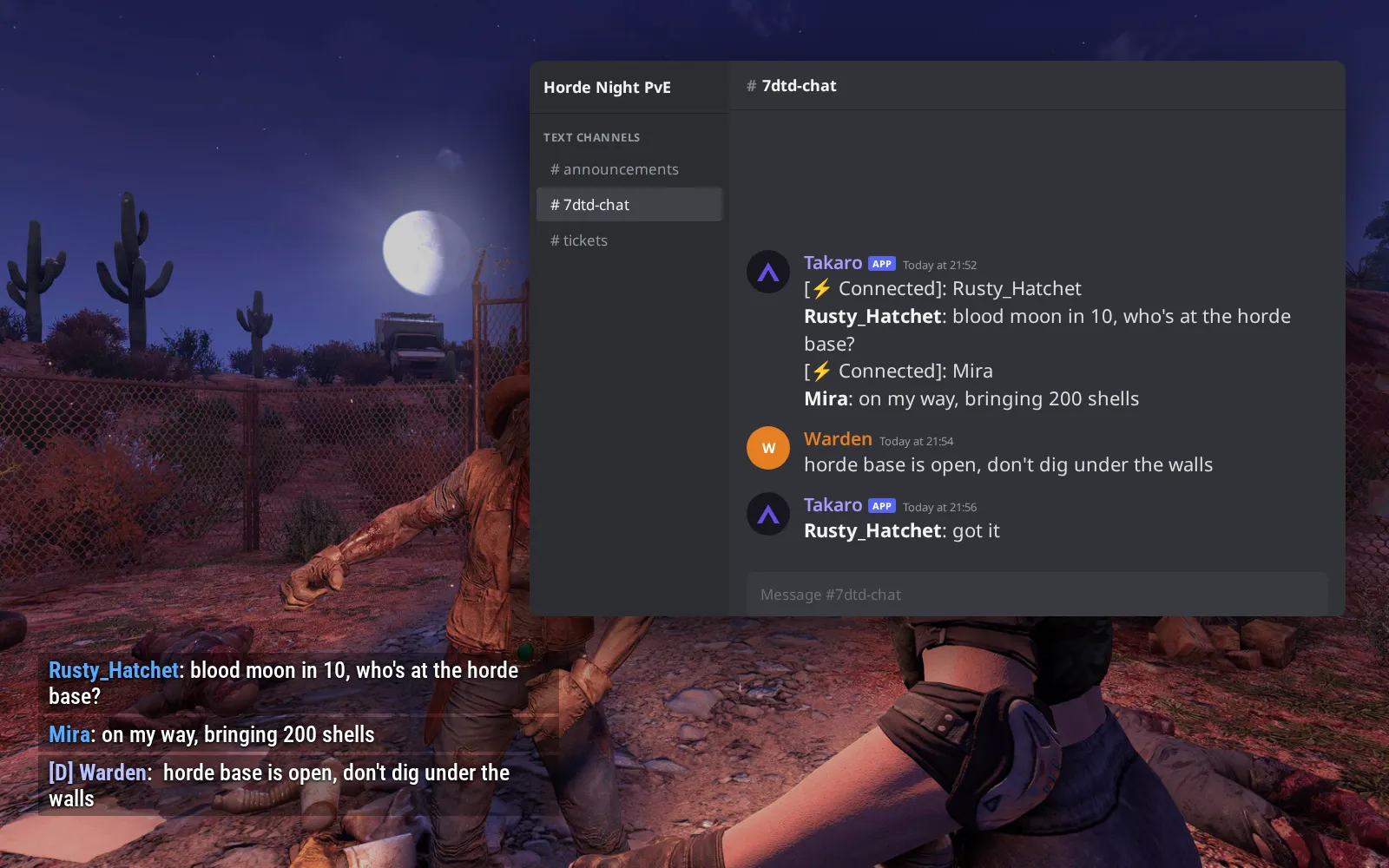
Coins for every zombie, spent at your own trader
Each zombie or animal a player kills pays your server's currency at a rate you set, and a role can earn more; kills pay out every few minutes. (1) Typing /shop 1 lists the first five things your trader sells. (2) /shop 1 5 buy puts 100 Shotgun Shells straight into their inventory. (3) Your trader's stock also shows as cards on the server's storefront page.
Browse the economy modules →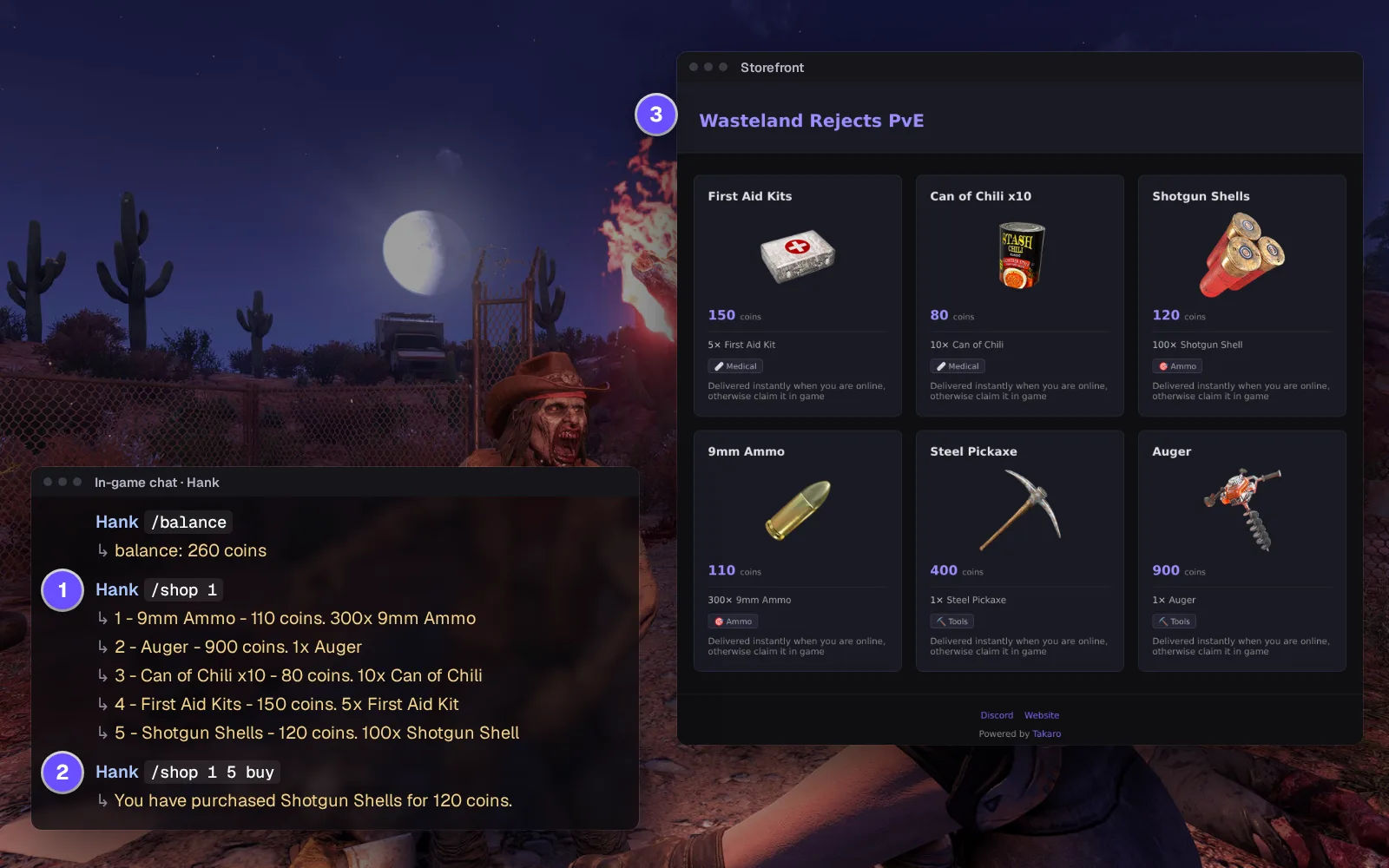
Everything else for your 7 Days to Die server
Ban without a Steam ID in telnet
Kick with a reason, ban for a set time or for good, and lift it later from the player's profile. The ban lands in the server's own ban list.
The console, in a browser tab
Run console commands and read the output, including the error for a typo, without opening a telnet session.
Warn them before the shutdown
Schedule messages, then a warning and a clean shutdown at the hour you pick; your host brings the server back. Takaro doesn't know the in-game day, so you set the schedule around your blood moons.
Pull them out of the sinkhole
Teleport a player to coordinates from the browser. They land on solid ground, not at the exact height you typed.
Download the 7 Days to Die connector
Server-side mod that connects a 7 Days to Die dedicated server to Takaro.
Before you start
- 7 Days to Die dedicated server (Linux or Windows)
- Takaro registration token
Latest release
Next steps
- Create the server in the Takaro dashboard and copy its registration token.
- Unzip the Takaro mod that matches your game version into the server's Mods folder, start the server, and paste the code from Takaro into the config file it creates.
Full 7 Days to Die install guide →
Previous versions (2)
Free to start. Upgrade when you grow.
The free tier includes one server with all modules, full API access, and Discord integration. Paid plans start at €7.99/month.
7 Days to Die server management FAQ
Is there a live map for a 7 Days to Die server?
Yes: open the Map page to see who is online and where, and switch to the Tracker to replay the past. It uses the map tiles the game renders, so set EnableMapRendering to true in serverconfig.xml; that works with the Takaro mod and with the built-in integration. How the map and Tracker work.
How do I find out who looted a base on my 7 Days to Die server?
Draw a box around the base on the Tracker and set the hours. Takaro lists who was seen inside and when, and the Theft tab shows what they gained there: strong evidence of who took the loot, not proof.
Can I see what a player had before they died on horde night?
Yes. Select the player on the Tracker and move to the moment before the death: the panel shows their inventory then, and every change in the range. Give items back from their profile by name, amount and quality.
How do I ban or unban a player on a 7 Days to Die server without telnet?
Open the player in Takaro and choose kick, a timed ban or a permanent ban; unban from the same place. On the mod, the ban goes into the server's own ban list but isn't logged as a Takaro event.
Can I pay players for zombie kills on my 7 Days to Die server?
Yes. The kill reward in the economy module pays currency for every kill at a rate you set, with higher rates for roles you choose. Players spend it with /shop.
Which 7 Days to Die version does the mod support?
V3.3.0, the default, and V3.2.0. Each download names the game build it was made for, so pick the one that matches your server. On another build the mod may load, but it hasn't been tested there.
Can I bring my data over from CSMM?
Yes, as a best-effort migration: players, roles, currency and shop listings come across, and you rebuild custom hooks, commands and cron jobs in Takaro. CSMM migration guide. Running a Project Zomboid server too? It sits in the same dashboard.
Can I manage multiple 7 Days to Die servers from one dashboard?
Yes. Add as many servers as your plan allows. The free tier includes one server; paid plans cover two to eight, all from a single dashboard.
Is Takaro a replacement for my server host?
No. Takaro is a management layer on top of the server you already run. You keep your hosting provider; Takaro connects to the server and adds economy, teleports, moderation and analytics.
Can I write custom modules?
Yes. Takaro modules are commands, hooks and cron jobs you can write yourself, and the REST API is open for anything a module cannot reach.
How much does it cost?
The free tier covers one server with every module included. Paid plans start at €7.99/month for two servers. See all plans.
Is 7 Days to Die support official?
Yes. Takaro builds, tests and releases this connector itself, with versioned releases and a documented install. Bugs go to the connectors repository.
Latest about 7 Days to Die
All 7 Days to Die posts →- PrismaCore is now ServerCore: 7 Days to Die admin guide PrismaCore (CPM) is now ServerCore for 7 Days to Die: same commands and data files, open source under MIT. Which version to run and how to switch.
- How to Set Up Cross-Server Teleports in Takaro Step-by-step guide to setting up teleport modules across your game servers. Works for Rust, 7D2D, and Minecraft.
- CSMM Is Evolving Into Takaro CSMM is becoming Takaro. Multi-game support, a new dashboard, and a fresh start. Here's what's changing and why.
Ready to manage your 7 Days to Die server?
Install the connector, connect, and start adding features in minutes.
Running more than one game?
One Takaro account runs every game below, with one player profile across all of them.