
SCUM server admin tools that show who was at the base
Pick any prisoner on your SCUM server and replay their night on the island: where they went, which puppets they killed, when they died and what they carried before and after they stood at someone else's base. SCUM is run from inside the game; this is the admin seat outside it, with a memory.
Windows dedicated server. Works with BattlEye on.
- Free for one server, with every module
- Kick, ban and message without joining the island
- Reconnects by itself after every scheduled restart
Tickets that land after a SCUM night
"Our base got opened while we were all offline"
Offline protection only starts after the last squad member logs off, and one login can drop it again. The squad has a name, the other squad has an alibi.
With Takaro Draw around their base for the night and read who was inside, from when to when. Theft lists who gained items in there.
"Ban him, he already logged off"
#Ban needs you in the game, and the other way is editing BannedUsers.ini and waiting for the next restart before it does anything.
With Takaro Ban from his profile in the browser, for three days or for good. When he tries to rejoin he's turned away before his character loads.
"Where is he? He's camping our base"
#Location answers one name at a time, and you have to be on the server to type it.
With Takaro Open the map for everyone on the island at once, offline players where they logged out, then play back the last hour.
Ban the raider who already logged off
In game, #Ban needs you on the island while he's still there, and the other way is editing BannedUsers.ini and waiting for the next restart. In Takaro you (1) find him on the Players list, offline or not, (2) write the reason and pick when the ban ends, or leave it empty for good, and (3) press Ban player. When he tries to rejoin he's turned away before his character loads, a timed ban lifts itself, and the ban survives a wipe because it lives in Takaro.
How bans work →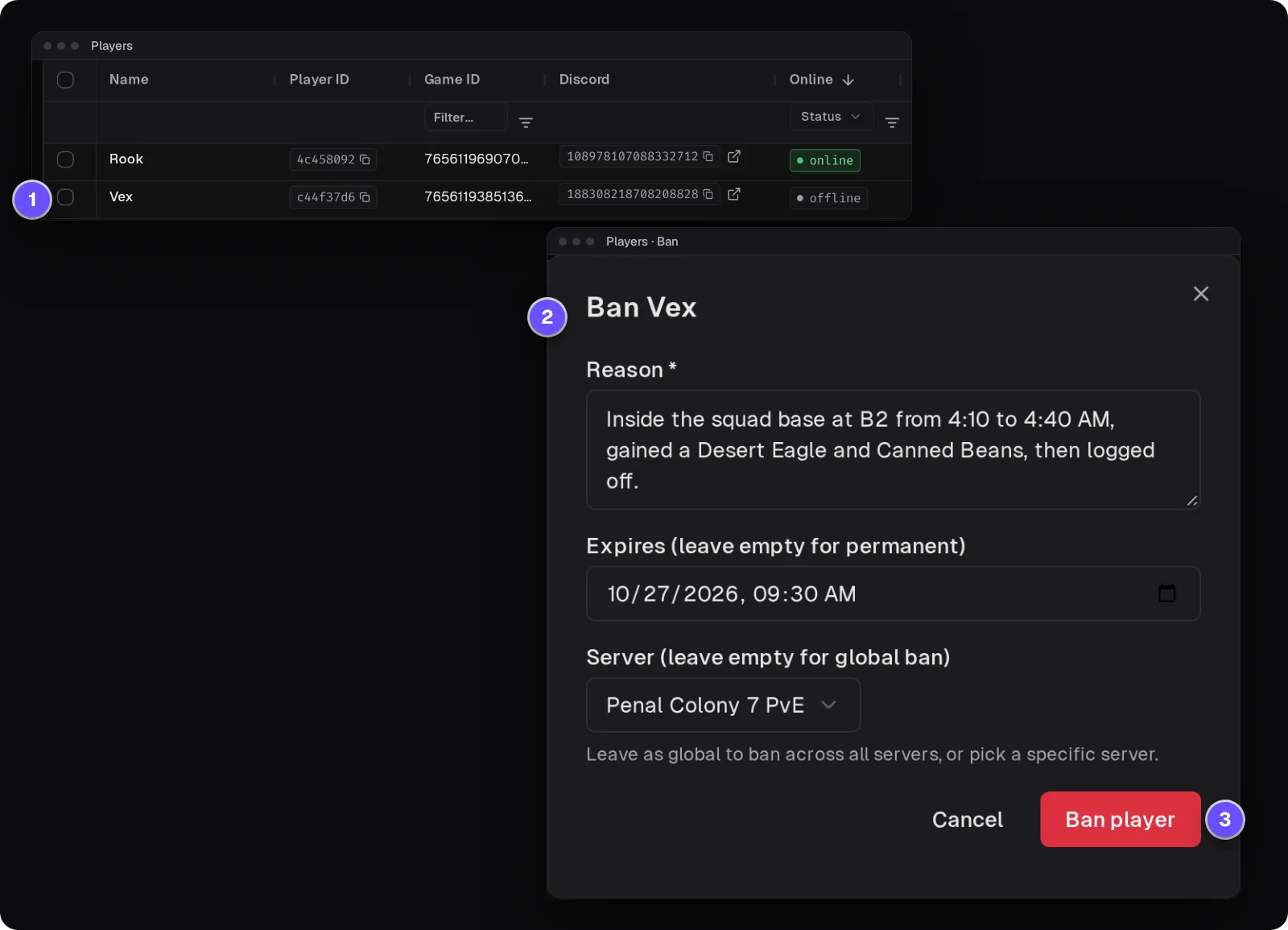
Who was at that base between 4 and 5 AM?
On the Tracker, the map's history view, box in the squad's base and pick the hours of the raid. Area search gives every prisoner seen inside with the first and last time; the Theft tab lists what they gained while in there, here an AKM, magazines and a Desert Eagle. That's strong evidence, not proof: positions are samples, and an item can come from a squadmate. Check the trail before you ban.
How area search and Theft work →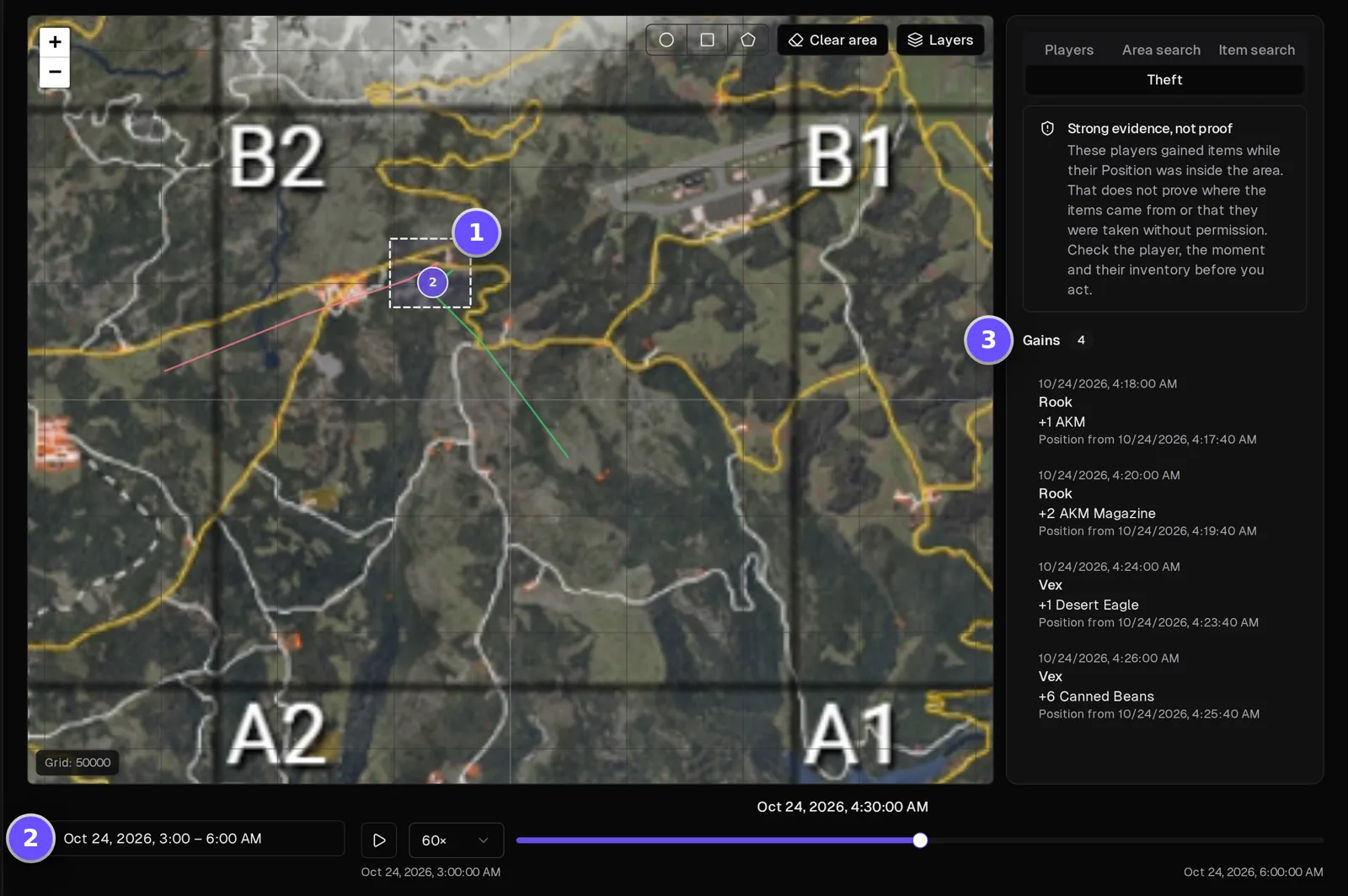
Everything one prisoner did, in order
Filter the server's events to one player and read their night top to bottom: when they joined, what they said, which puppets they killed and with which weapon, what they bought, when they died and when they left. No log files, no FTP.
How the Tracker works →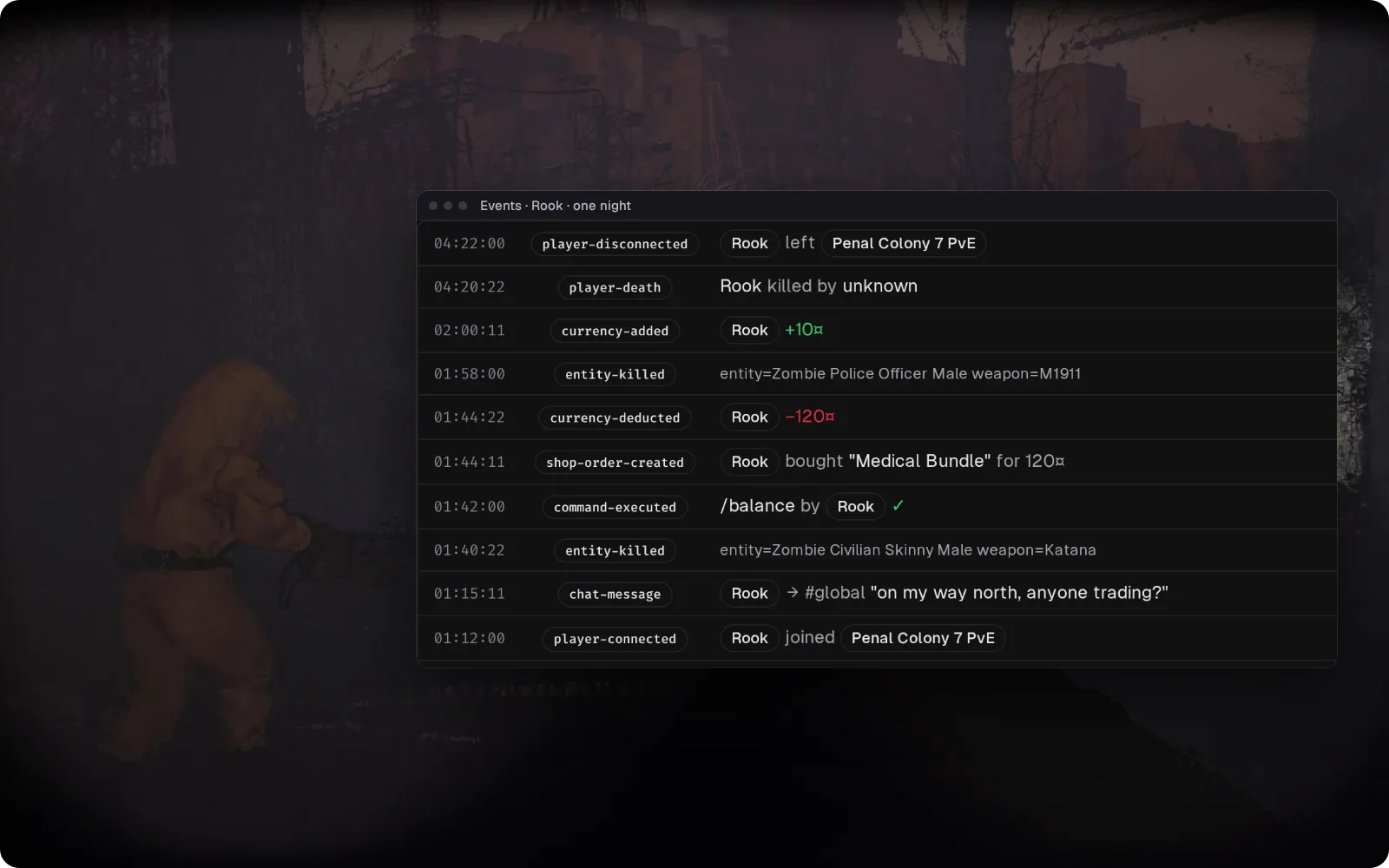
Answer the island from Discord during a restart
Global chat lands in a Discord channel you pick, and what you type there shows up in the island's chat. Joins and leaves are posted too, so "restart in 10 or 30?" gets an answer while you're nowhere near the server.
Set up the Discord bridge →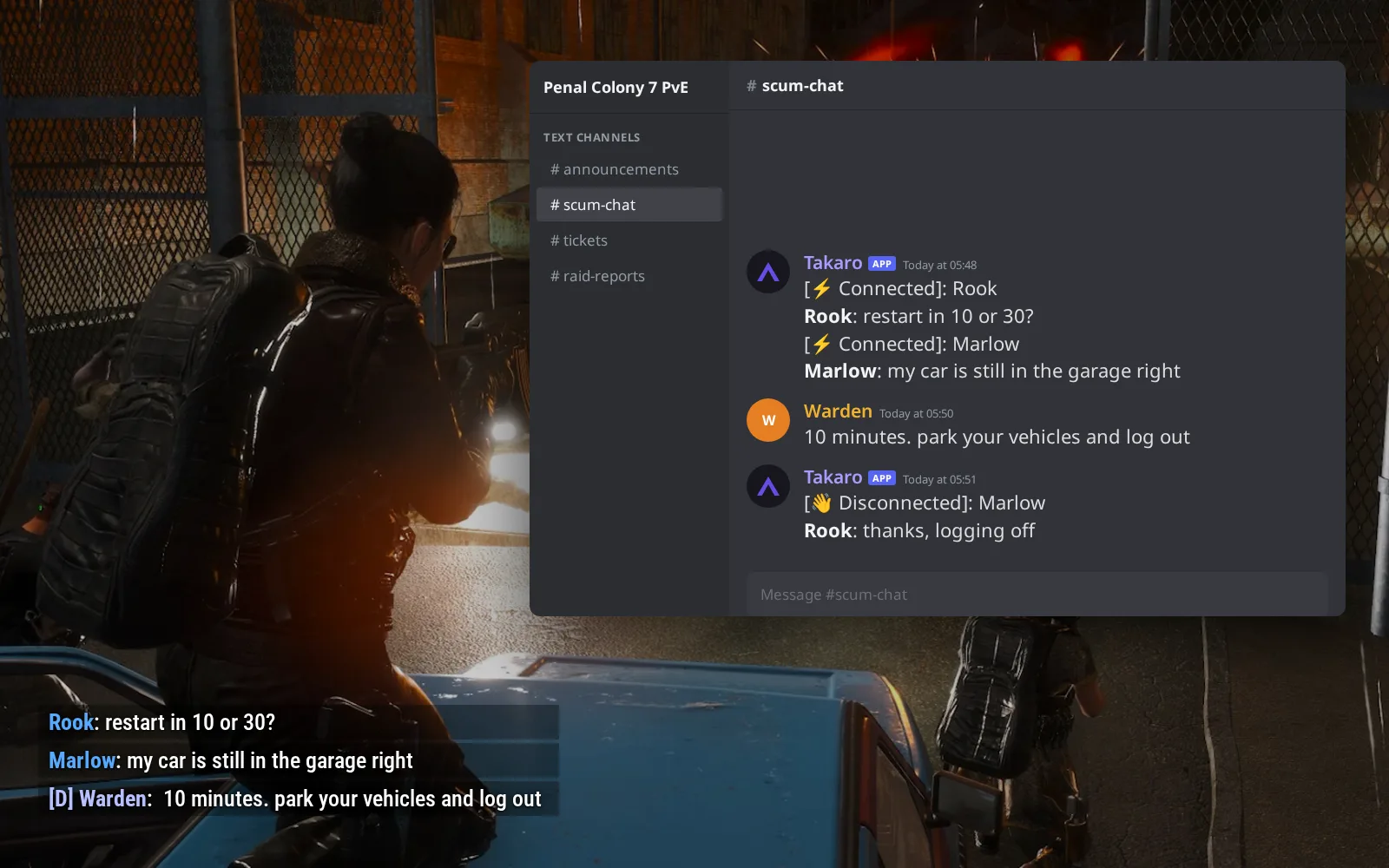
Coins for every puppet, spent in your shop
Each puppet or animal a player kills pays your server's currency at a rate you set, every few minutes. (1) @shop 1 lists locks, backpacks and bundles with their price. (2) @shop 1 5 buy hands over the Medical Bundle, into the pockets or at their feet. (3) Prisoners can browse the same locks and bundles as cards on your storefront page.
Browse the economy modules →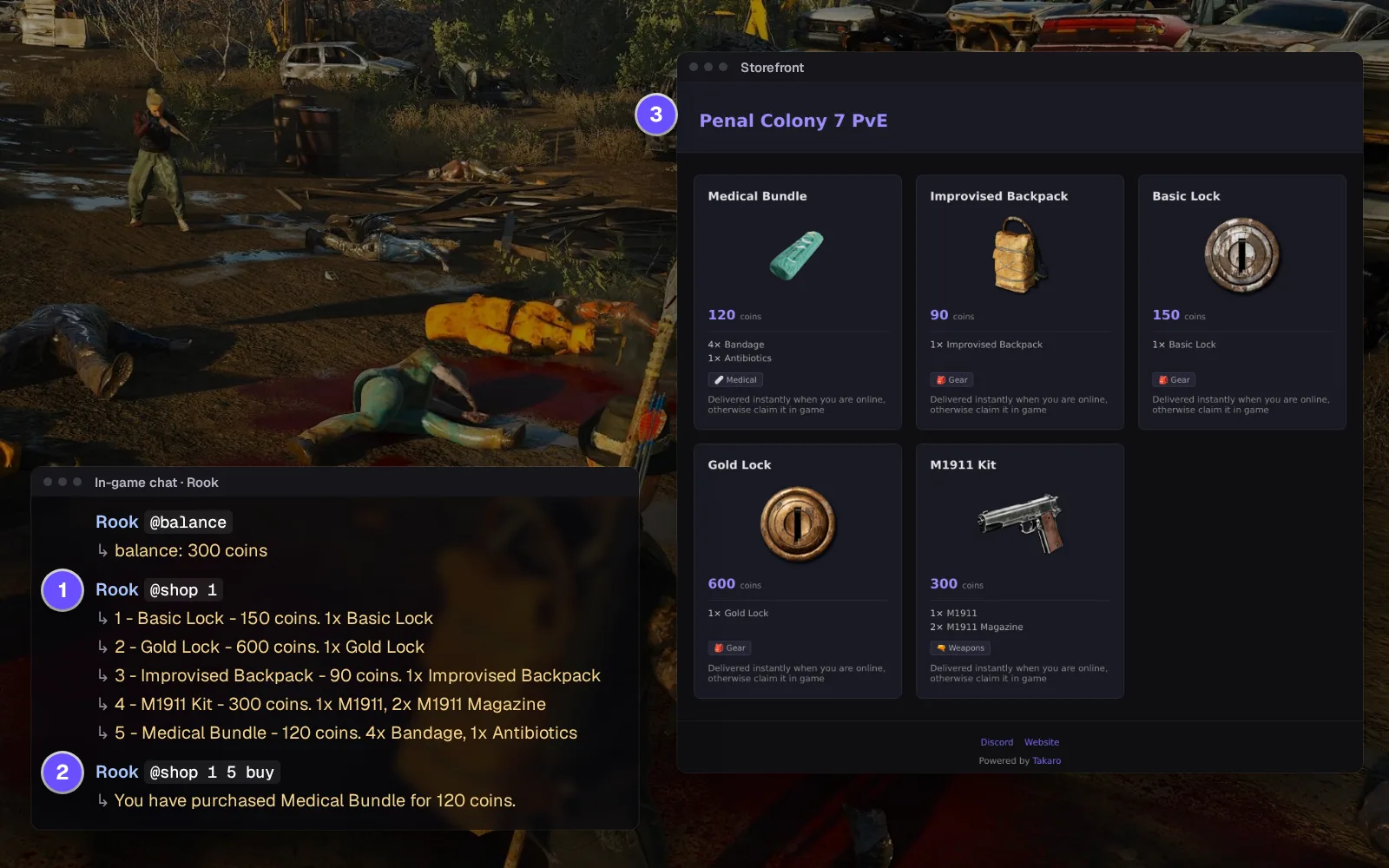
Everything else for your SCUM server
Timed bans that lift themselves
Ban online or offline for a set time or for good. Unban with one click, including bans that were already in BannedUsers.ini when the server started.
Check what a prisoner carries
Clothes, hands, holster and backpack, with stack sizes. Handy for "I got robbed" tickets. Rounds inside magazines aren't listed.
Hand over items from the catalogue
Search the item catalogue instead of typing a spawn name in chat. It lands in their pockets or at their feet.
Messages in the orange server line
Broadcast to everyone or message one player from the browser: restart warnings, raid-window reminders, a word with a rule-breaker.
Download the SCUM connector
Native connector for SCUM dedicated servers: one UE4SS mod inside SCUMServer.exe that connects to Takaro itself, no sidecar.
Before you start
- SCUM Windows dedicated server (Steam app 3792580) build named in the release
- File access to the server's SCUM\Binaries\Win64 folder
- Takaro registration token
Latest release
Next steps
- Create the server in the Takaro dashboard and copy its registration token.
- Stop the server, unzip the connector next to
SCUMServer.exe, paste the code Takaro gives you into its config file, and start the server again.
Previous versions (1)
Free to start. Upgrade when you grow.
The free tier includes one server with all modules, full API access, and Discord integration. Paid plans start at €7.99/month.
SCUM server management FAQ
Is there RCON or a web admin panel for a SCUM server?
SCUM has no RCON, and its admin commands need an admin on the island. Takaro is the browser panel: kick, ban, message, teleport, give items and the map, without joining.
How do I ban a player on SCUM who already logged off?
Ban the prisoner from their Takaro profile, for days or permanently. They're refused within a second of rejoining, before the character loads; no BannedUsers.ini edit, no restart. See how bans work.
Who raided our base on my SCUM server, and how do I find out?
Open the Tracker, set the hours of the raid and draw around the base. Takaro lists who was seen inside and when, and the Theft tab shows who gained items there: strong evidence of the raid, not proof of who did it.
How do I see where players are on my SCUM server?
Open the Map page: everyone on the island at once, and offline players where they logged out. No #Location per name.
Can I connect my SCUM server chat to Discord?
Yes, both ways: global chat goes to a Discord channel you pick, and staff replies from Discord show up in game.
Does it work with BattlEye on?
Yes. It was tested with BattlEye on and off.
Can I run Takaro on a Linux SCUM server?
No. The connector runs next to the Windows SCUMServer.exe only. If you also run a Dune: Awakening battlegroup, it sits in the same dashboard.
Can I manage multiple SCUM servers from one dashboard?
Yes. Add as many servers as your plan allows. The free tier includes one server; paid plans cover two to eight, all from a single dashboard.
Is Takaro a replacement for my server host?
No. Takaro is a management layer on top of the server you already run. You keep your hosting provider; Takaro connects to the server and adds economy, teleports, moderation and analytics.
Can I write custom modules?
Yes. Takaro modules are commands, hooks and cron jobs you can write yourself, and the REST API is open for anything a module cannot reach.
How much does it cost?
The free tier covers one server with every module included. Paid plans start at €7.99/month for two servers. See all plans.
Is SCUM support official?
Yes. Takaro builds, tests and releases this connector itself, with versioned releases and a documented install. Bugs go to the connectors repository.
Ready to manage your SCUM server?
Install the connector, connect, and start adding features in minutes.
Running more than one game?
One Takaro account runs every game below, with one player profile across all of them.