
VEIN dedicated server admin tools, without RCON
Pick any survivor on your VEIN server and replay their night on the map: where they went, which zombies they killed, how they died and what was in their bag. When a base gets claimed or a character is gone after a restart, you start from that record.
Linux dedicated servers. Players install nothing.
- Free for one server, with every module
- Two files next to the game binary. Players keep the vanilla client
- Events are kept on disk if the link to Takaro drops
Tickets every VEIN admin knows
"Someone claimed our Utility Cabinet"
The base was fine at midnight. By morning a stranger owned the cabinet and everything in range, and the group wants names.
With Takaro Draw a box around the base for the night and read who was inside, from when to when, and what they gained there.
"I logged in and my character was gone"
A restart, a hotfix that didn't apply, and a survivor starts over with nothing. Your Discord hears about it before you do.
With Takaro Warn everyone before the server stops and let it save first. Their coins, history and the bag they had at 10 PM are still in Takaro, so you decide what to give back.
"Ban him, he just logged off"
There's no RCON, the admin menu only works in game, and unbanning means editing Game.ini and restarting.
With Takaro Ban from the browser, online or not, for a set time or for good. Unban is one click, with no restart.
"I logged in and my character was gone"
Takaro can't bring a character back, but it can tell you what they had. (1) On the Tracker, move to the minute before it went wrong and read the inventory. (2) Open Give Items from the survivor's row and add the same things. (3) Press Give items: they appear in the bag without a relog. Inventory is checked at intervals, so check the last few changes before you hand anything back.
How inventory history works →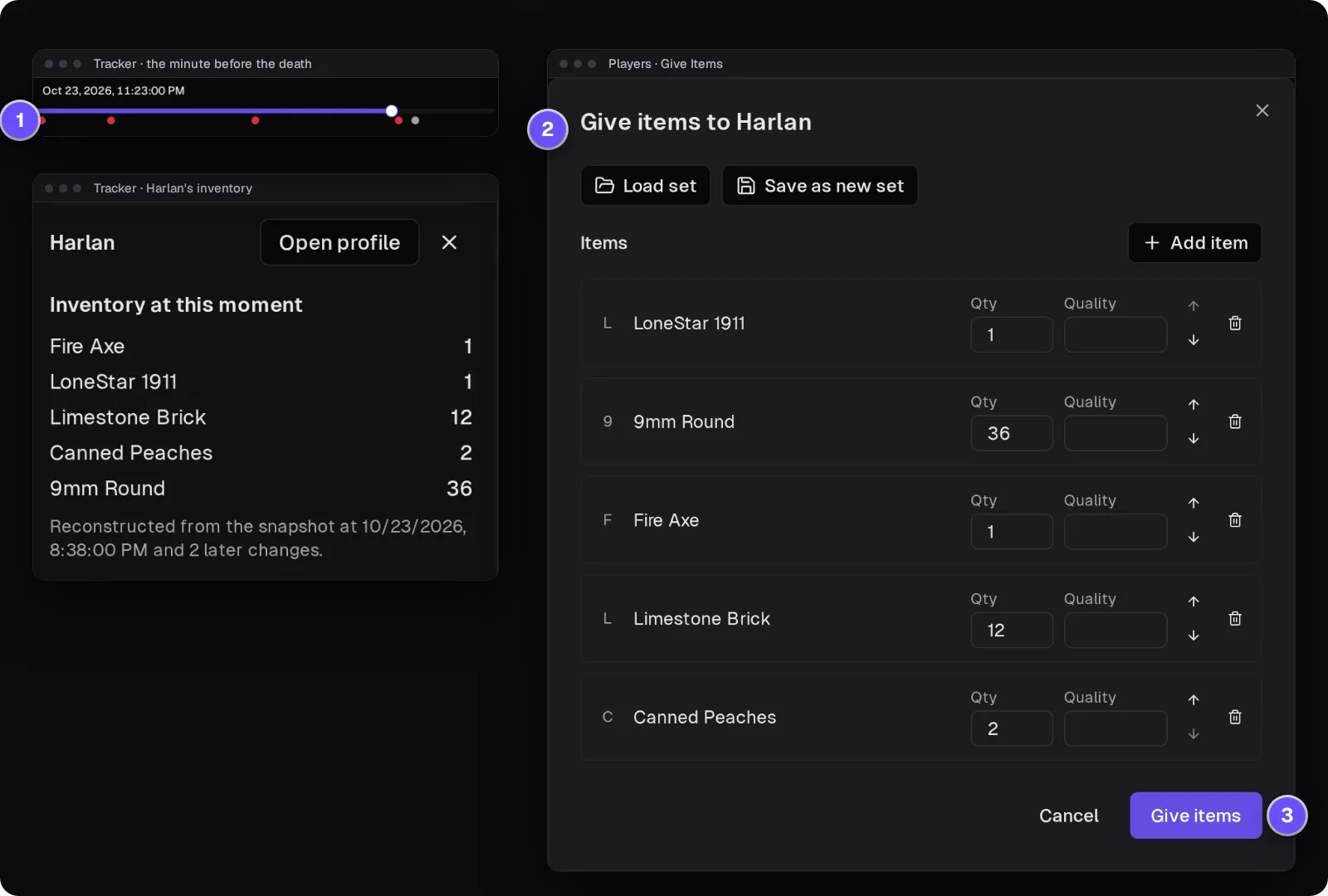
Who was at the base between 1 and 4 AM?
Mark out the base on the Tracker, the map's history view, and choose the night. Area search lists every survivor seen inside with the first and last time; the Theft tab lists what they gained there, here a LoneStar 1911, 9mm rounds, a Fire Axe and Limestone Bricks. That's strong evidence, not proof: Takaro doesn't see the cabinet claim itself, and positions are samples.
How area search and Theft work →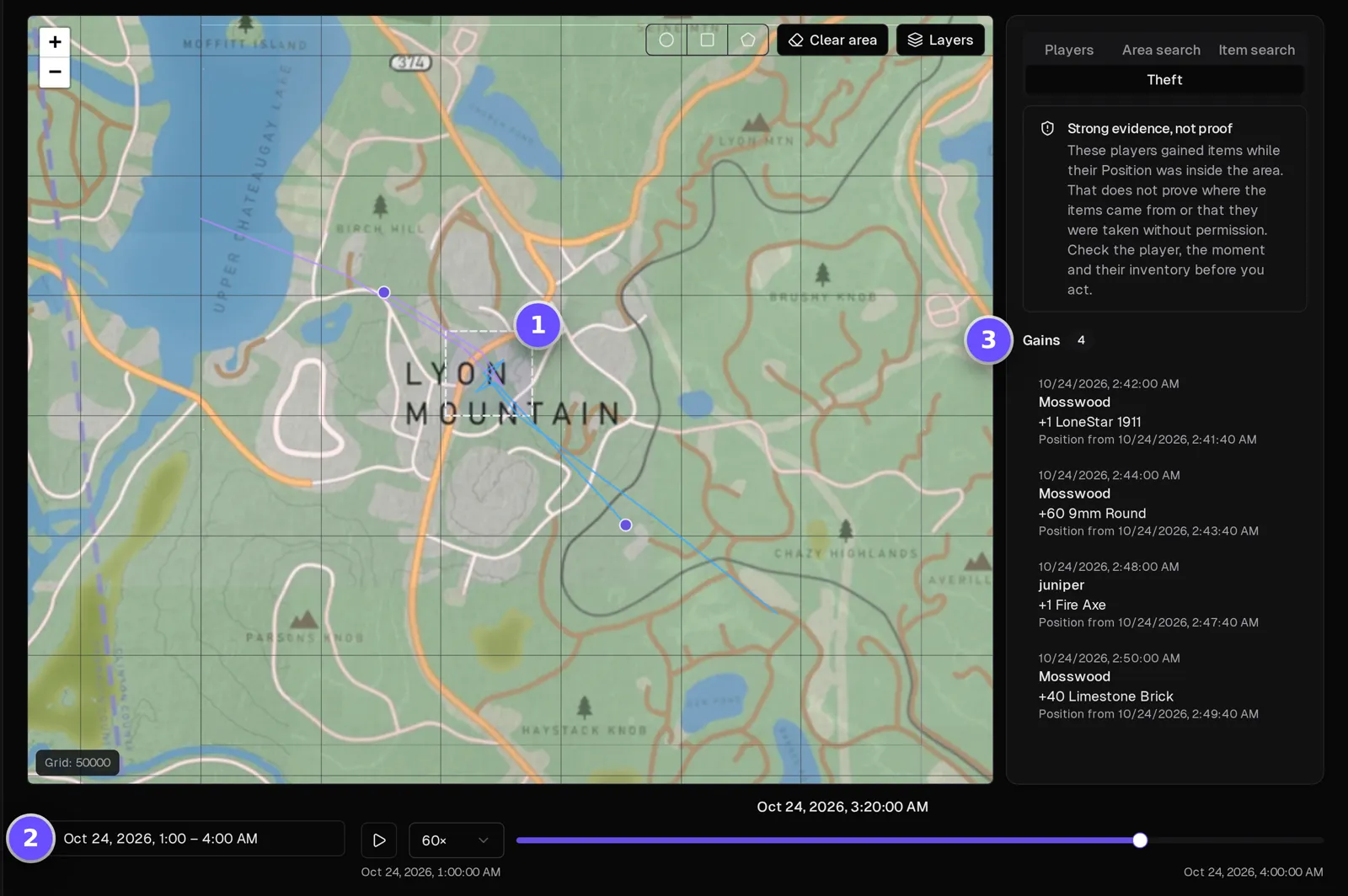
One survivor's night, start to finish
Filter the server's events to one player and read their night: when they joined, what they said, what they bought, every zombie they killed and with what, how they died and when they left. When a character goes missing, this is what they had going on.
How the Tracker works →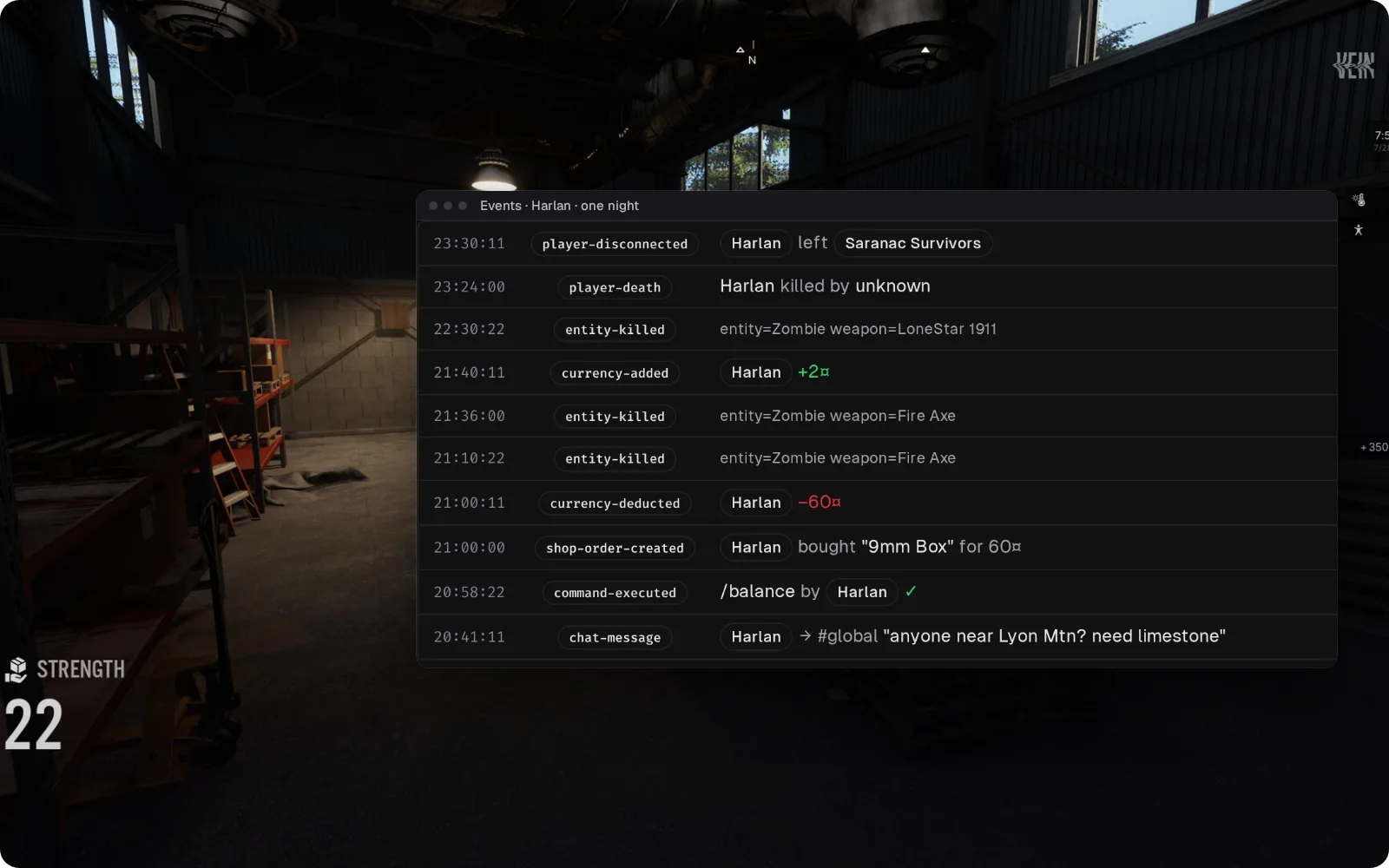
VEIN chat in Discord, and Discord back in game
Survivors' chat is posted to a Discord channel you pick, and what your staff type there shows up in game, so "is the restart still at 3:30?" gets an answer without anyone joining the server. Joins and leaves are posted too. VEIN reports nearby chat as global, so it reaches the channel as well.
Set up the Discord bridge →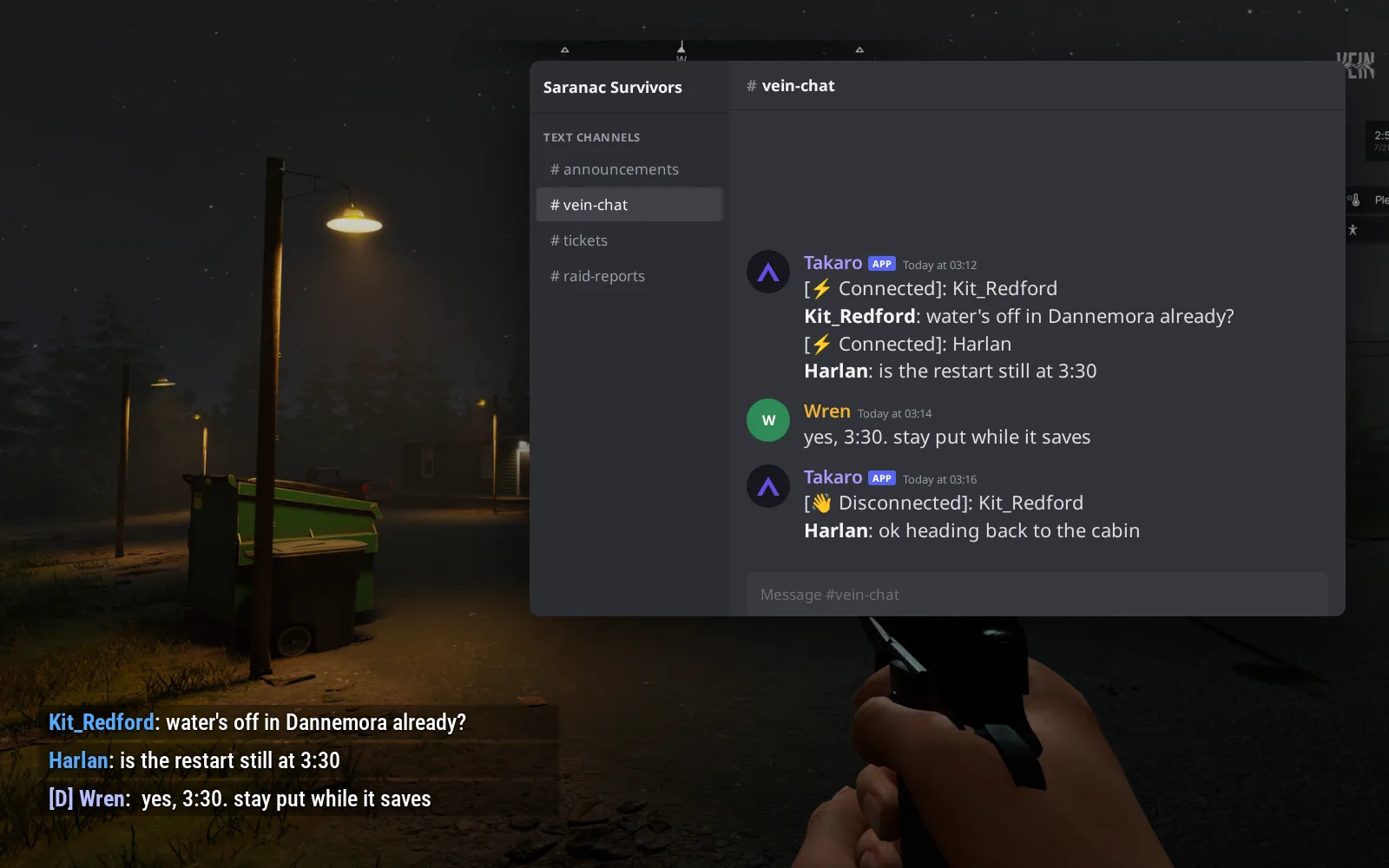
Coins for every zombie, kept through a character reset
Each zombie a player kills pays your server's currency at a rate you set, and balances live in Takaro, not in the save, so a lost character doesn't zero them. (1) @shop 1 lists the offers; VEIN shows the replies as on-screen notifications. (2) @shop 1 1 buy puts a 9mm Box in the bag. (3) Survivors can see the same offers as cards on your storefront page.
Browse the economy modules →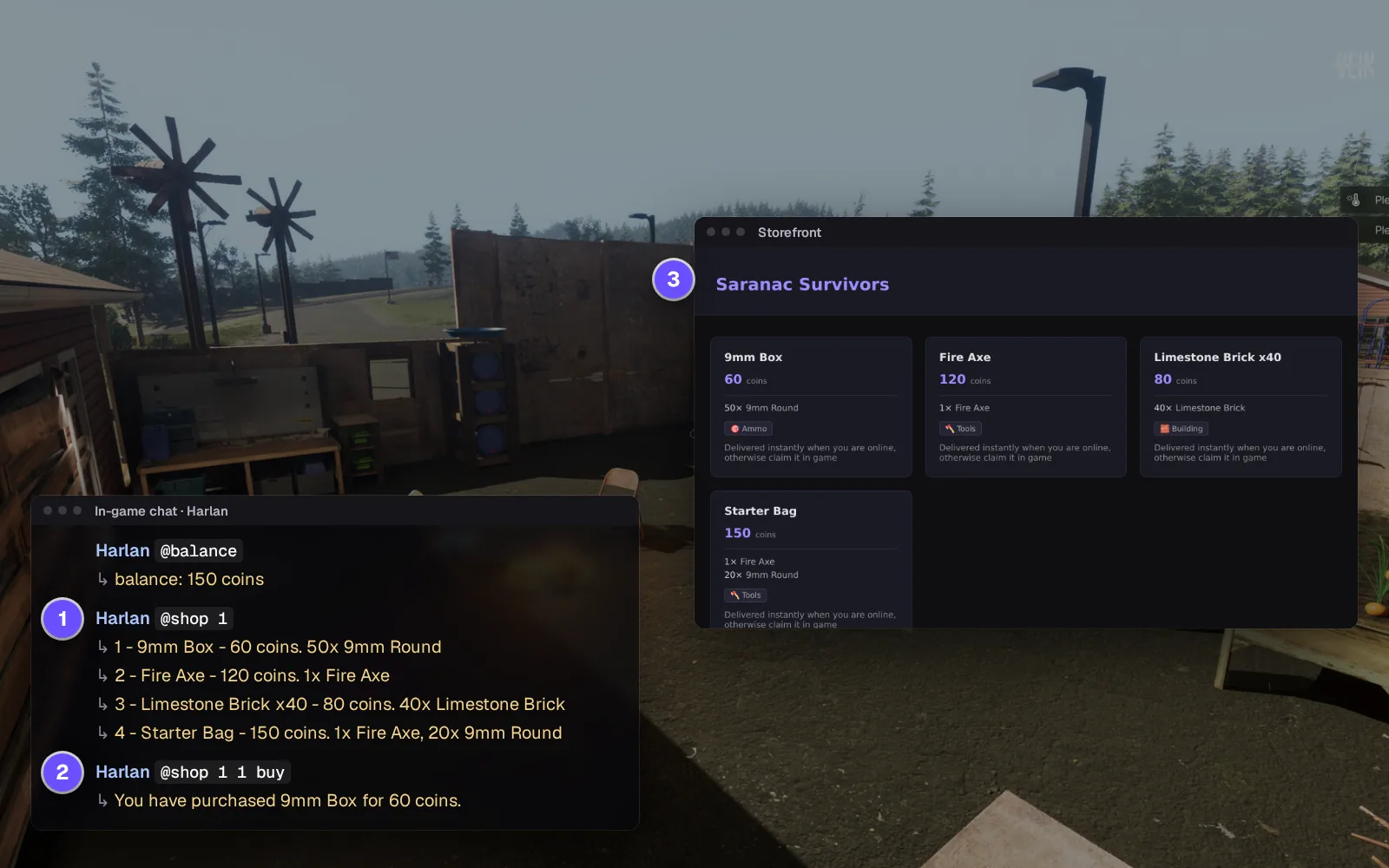
Everything else for your VEIN server
Unban without opening Game.ini
Bans from the game and from Takaro sit in one list with the reason. Timed bans lift themselves, even across a restart.
Give back what the restart took
Pick the item by its in-game name and it appears in the bag without a relog.
A hotfix breaks one thing, not everything
If a game update breaks one feature, the connector reports it as degraded and the rest keeps working.
The connector's own console
Run players, say, give, tp, ban and save from the browser, the commands VEIN no longer takes over RCON.
Download the VEIN connector
Native connector for a VEIN Linux dedicated server.
Before you start
- Takaro registration token
- File access to the VEIN Linux dedicated server's Vein/Binaries/Linux folder
Latest release
Next steps
- Create the server in the Takaro dashboard and copy its registration token.
- Upload the two connector files into your VEIN server's game folder, start the server, and paste the code Takaro gives you into the settings file it creates.
Previous versions (1)
Free to start. Upgrade when you grow.
The free tier includes one server with all modules, full API access, and Discord integration. Paid plans start at €7.99/month.
VEIN server management FAQ
Does VEIN have RCON for dedicated servers?
Not any more. Takaro doesn't bring RCON back; its connector talks to Takaro directly, and you kick, ban, message and give items from the browser instead.
How do I ban or unban a player on a VEIN server?
Open the player in Takaro and ban them for a set time or for good, online or offline. Unbanning is one click and they can rejoin at once, without editing Game.ini or restarting. See how bans work.
Who claimed or raided a base on my VEIN server?
Set the Tracker to the night in question and draw around the base. Takaro lists who was there and when, and the Theft tab shows who gained items inside. It can't see the cabinet claim itself.
Can Takaro save a character that was lost in a restart?
No. It warns players and saves the world before it stops, and it keeps their coins, history and what they carried, so you can give items back by name.
Is there a map for a VEIN server?
Yes. Takaro's Map page shows online survivors on your Champlain Valley map, and the Tracker replays where everyone went.
Does it work on a Windows VEIN server?
No. The connector runs on the Linux dedicated server only. Running Project Zomboid too? Add it to the same Takaro account.
Can I manage multiple VEIN servers from one dashboard?
Yes. Add as many servers as your plan allows. The free tier includes one server; paid plans cover two to eight, all from a single dashboard.
Is Takaro a replacement for my server host?
No. Takaro is a management layer on top of the server you already run. You keep your hosting provider; Takaro connects to the server and adds economy, teleports, moderation and analytics.
Can I write custom modules?
Yes. Takaro modules are commands, hooks and cron jobs you can write yourself, and the REST API is open for anything a module cannot reach.
How much does it cost?
The free tier covers one server with every module included. Paid plans start at €7.99/month for two servers. See all plans.
Is VEIN support official?
Yes. Takaro builds, tests and releases this connector itself, with versioned releases and a documented install. Bugs go to the connectors repository.
Ready to manage your VEIN server?
Install the connector, connect, and start adding features in minutes.
Running more than one game?
One Takaro account runs every game below, with one player profile across all of them.