
RuneScape: Dragonwilds server admin tools that work when the Owner is offline
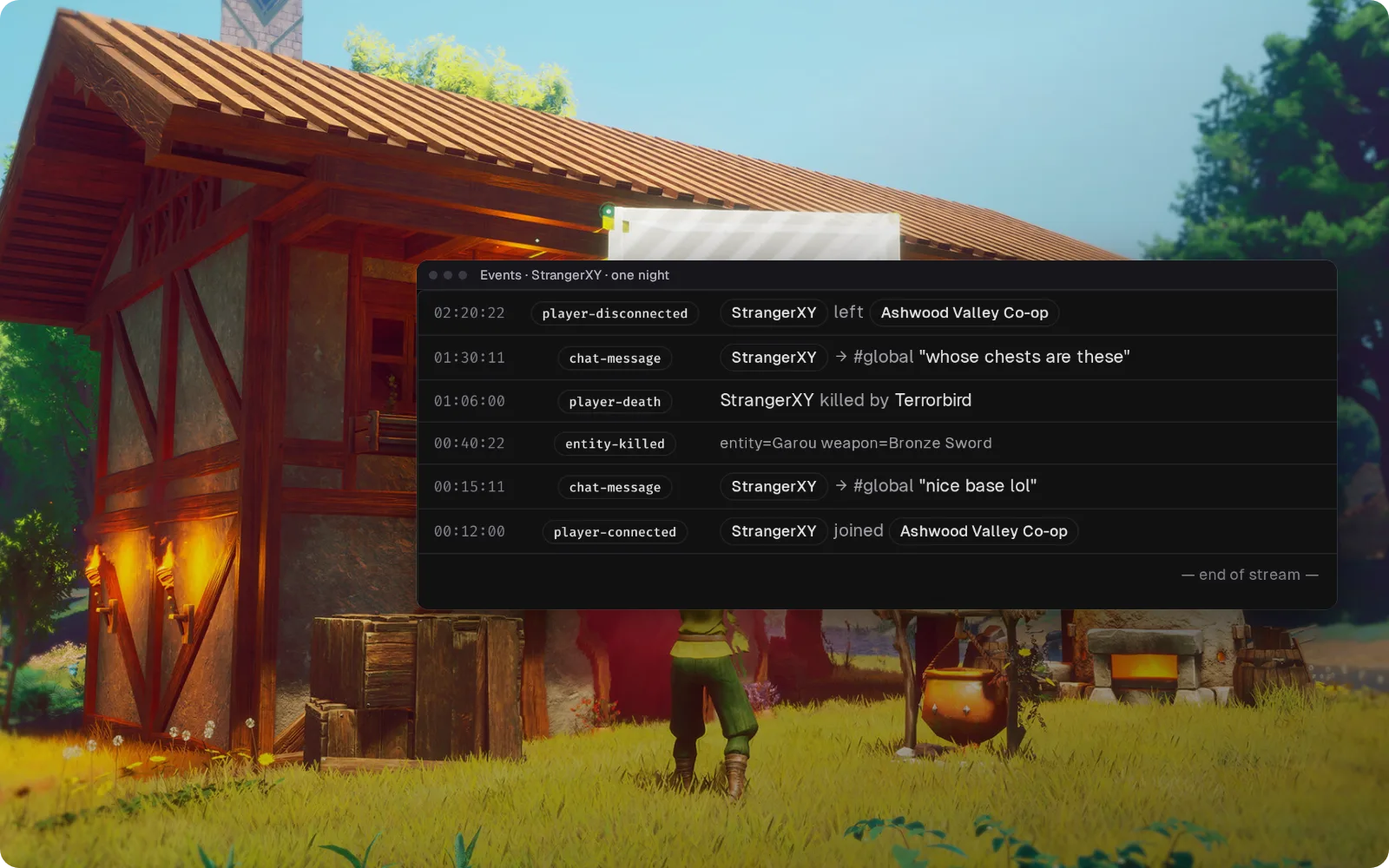
A stranger joins your public world at midnight and the Owner is asleep. Takaro keeps a log of every join, chat line, kill and death, gives each of your staff their own login, and puts kicks, bans and unbans in a browser, so the morning starts with a record and a ban, not a group chat.
Linux dedicated servers. Players install nothing.
- Free for one server, with every module
- A plugin and its settings file on the Linux server. Nothing for players
- Events queue on disk during an outage and arrive when Takaro is back
Tickets every Dragonwilds owner knows
"Can you unban me? Your admin got the wrong guy"
Admins can ban but can't unban. You're the Owner, and you're at work.
With Takaro Any staff member with ban rights unbans from the browser. It works straight away, also after a restart.
"Someone took our base apart last night"
Public worlds are open to anyone with the name, and an in-game ban only lands while the stranger is still online.
With Takaro The event log shows who joined and when, what they said and when they left. Ban them for a set time from the dashboard.
"Server's gone from the list again"
Another hotfix, another restart, and Discord fills up with "is it down?" while the world sits on the old build.
With Takaro A scheduled warning in game, then save and stop from the browser. Join notices in Discord tell everyone when people are back.
Ban and unban without waiting for the Owner
In Dragonwilds only the Owner can undo a ban, from inside the game, and admins can't act on someone who has left. In Takaro each of your staff has their own login: (1) read what the player did tonight on the Events page, (2) write the reason and pick when the ban ends, and (3) press Ban player while they're still on. A wrong ban is lifted from the browser by anyone with ban rights, and it works straight away. A banned player can connect for about a second before they're dropped.
How bans work →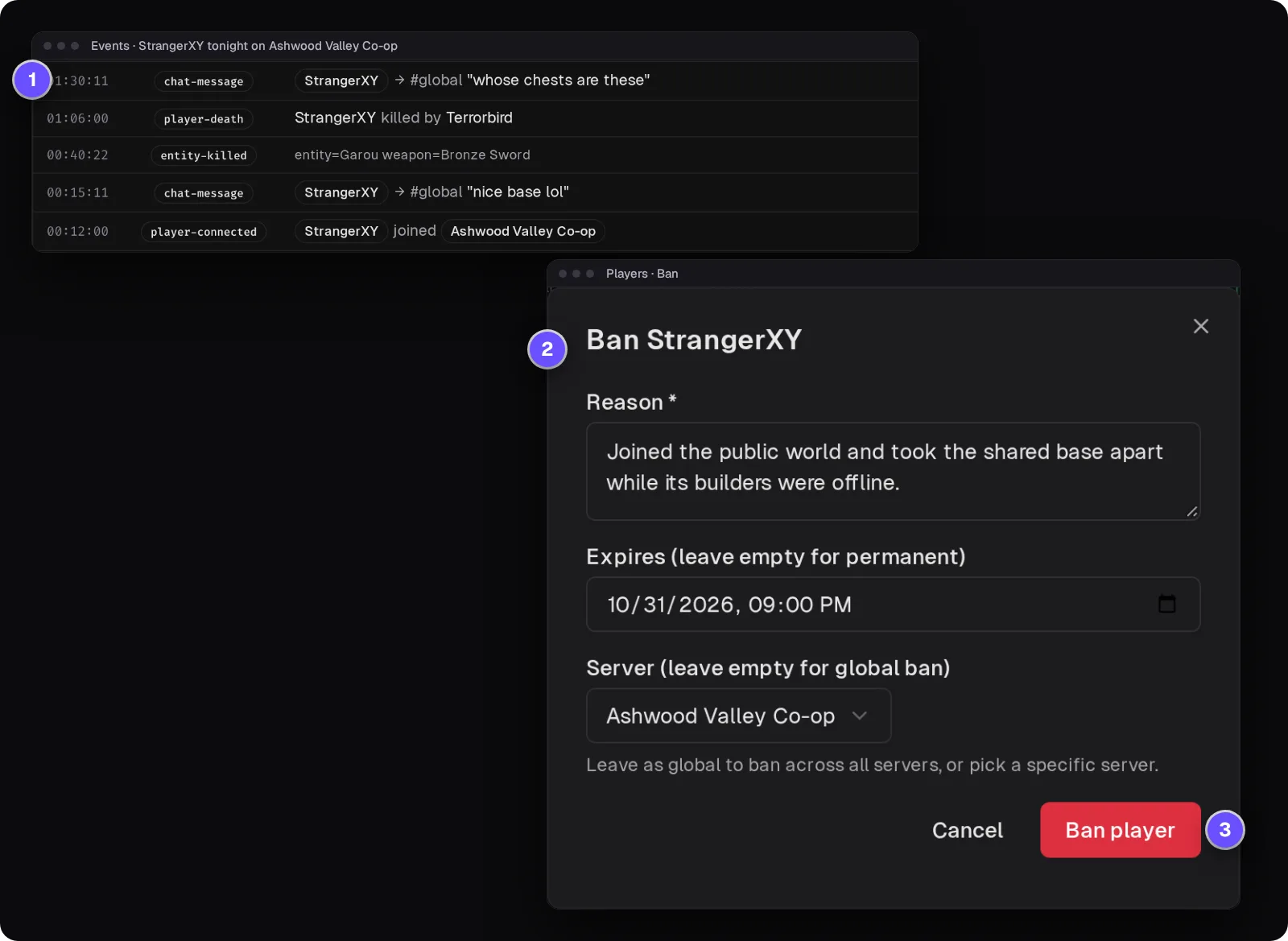
Hotfix day without the "is it down?" flood
Scheduled messages tell everyone a Jagex hotfix is coming, a timed shutdown warns them and saves before it stops, and once your host brings the server back on the new build the connector picks up where it left off. Messages show under the receiving player's name, with a prefix.
Browse the modules →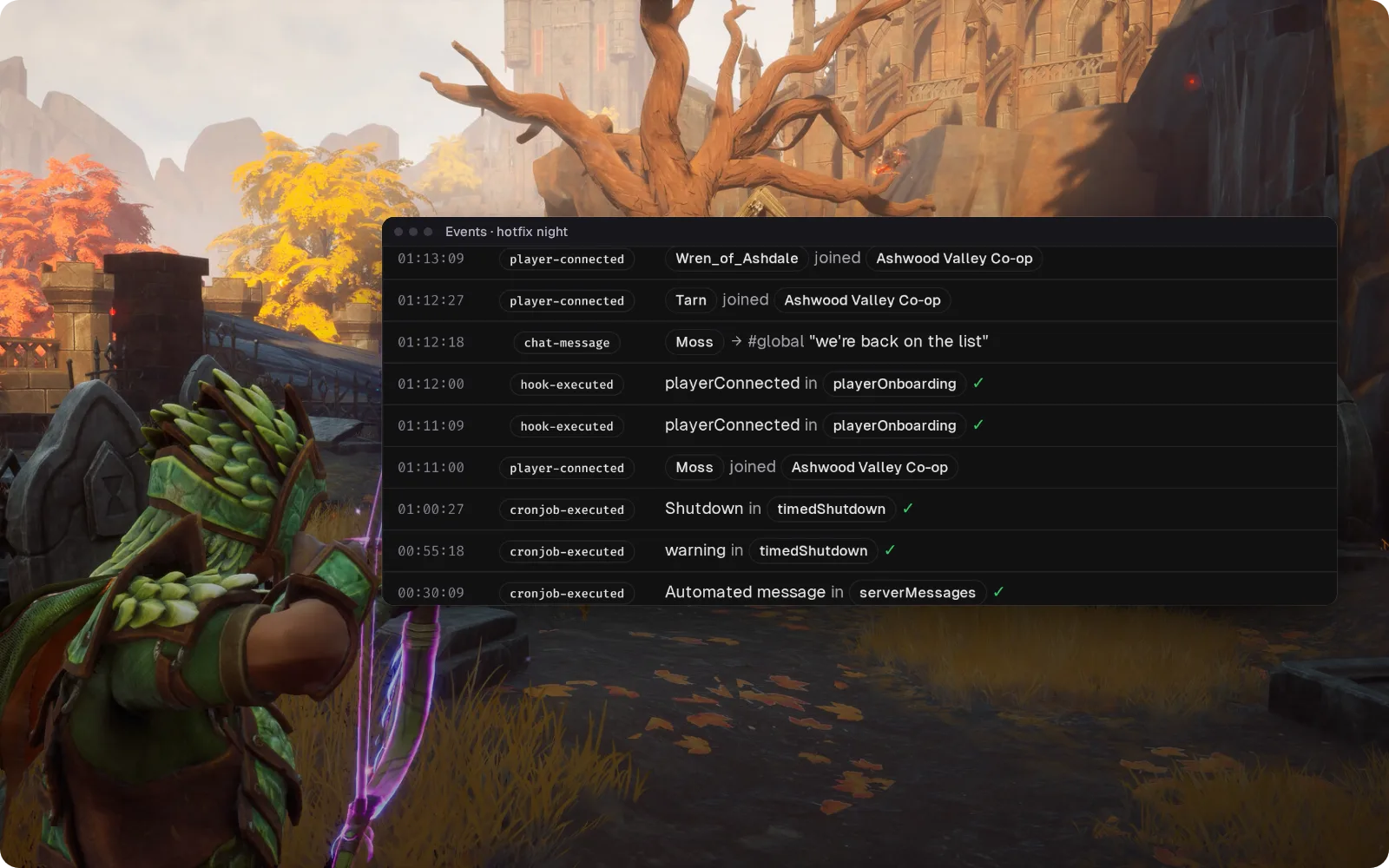
See who's on before you launch the game
Joins, leaves and game chat land in a Discord channel you pick, so you know a stranger just walked into your world without logging in. Messages from Discord into the game aren't verified on Dragonwilds yet.
Set up the Discord bridge →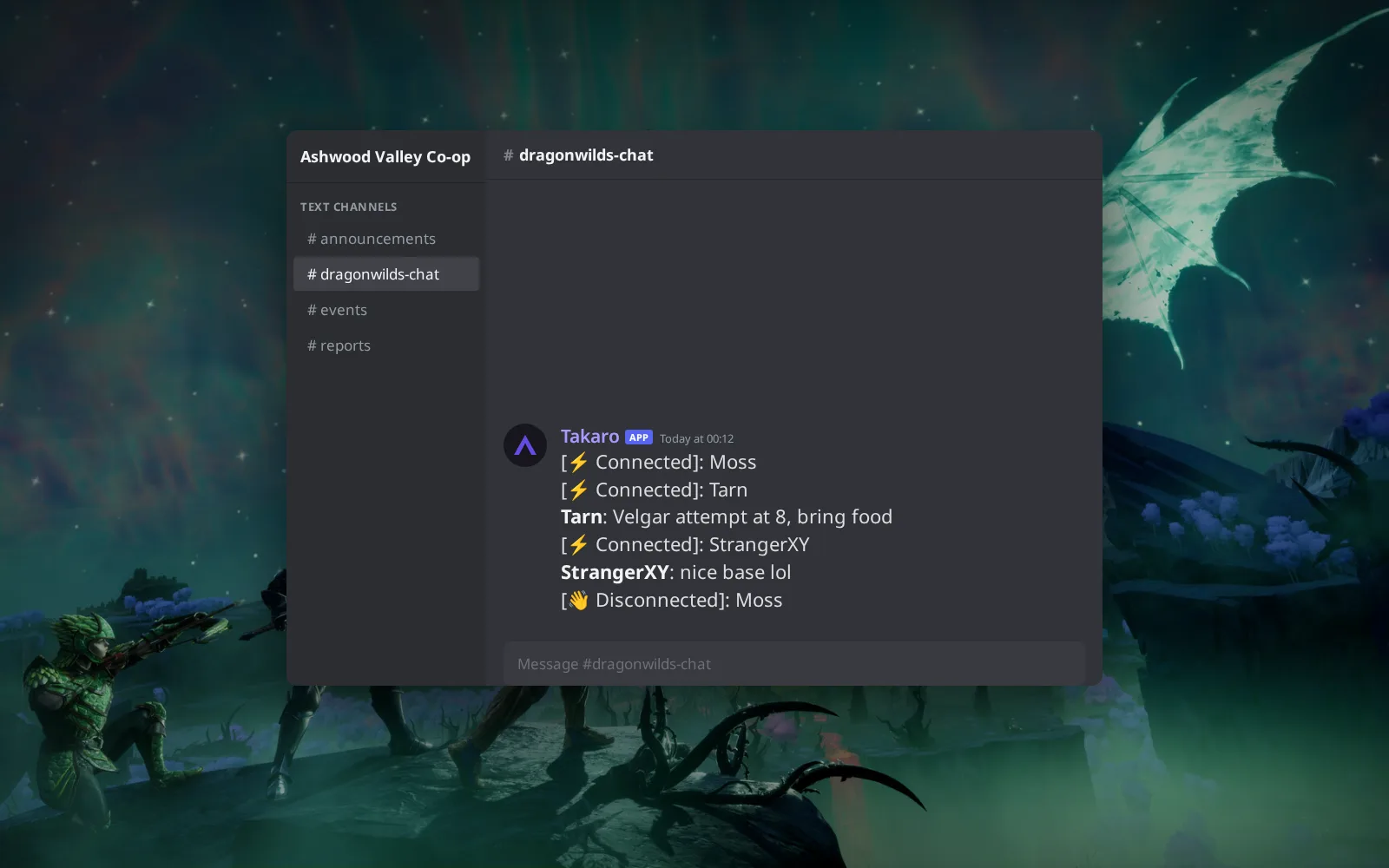
Order now, claim when you log in
Sell bundles of food, logs or ore for your server's currency; an order paid while they're offline waits for them, and a purchase without enough coins is refused. (1) /shop 1 lists logs, ore and bundles. (2) /shop 1 1 buy orders 50 Ash Logs. (3) The bundles also show as cards on your server's storefront page.
Browse the economy modules →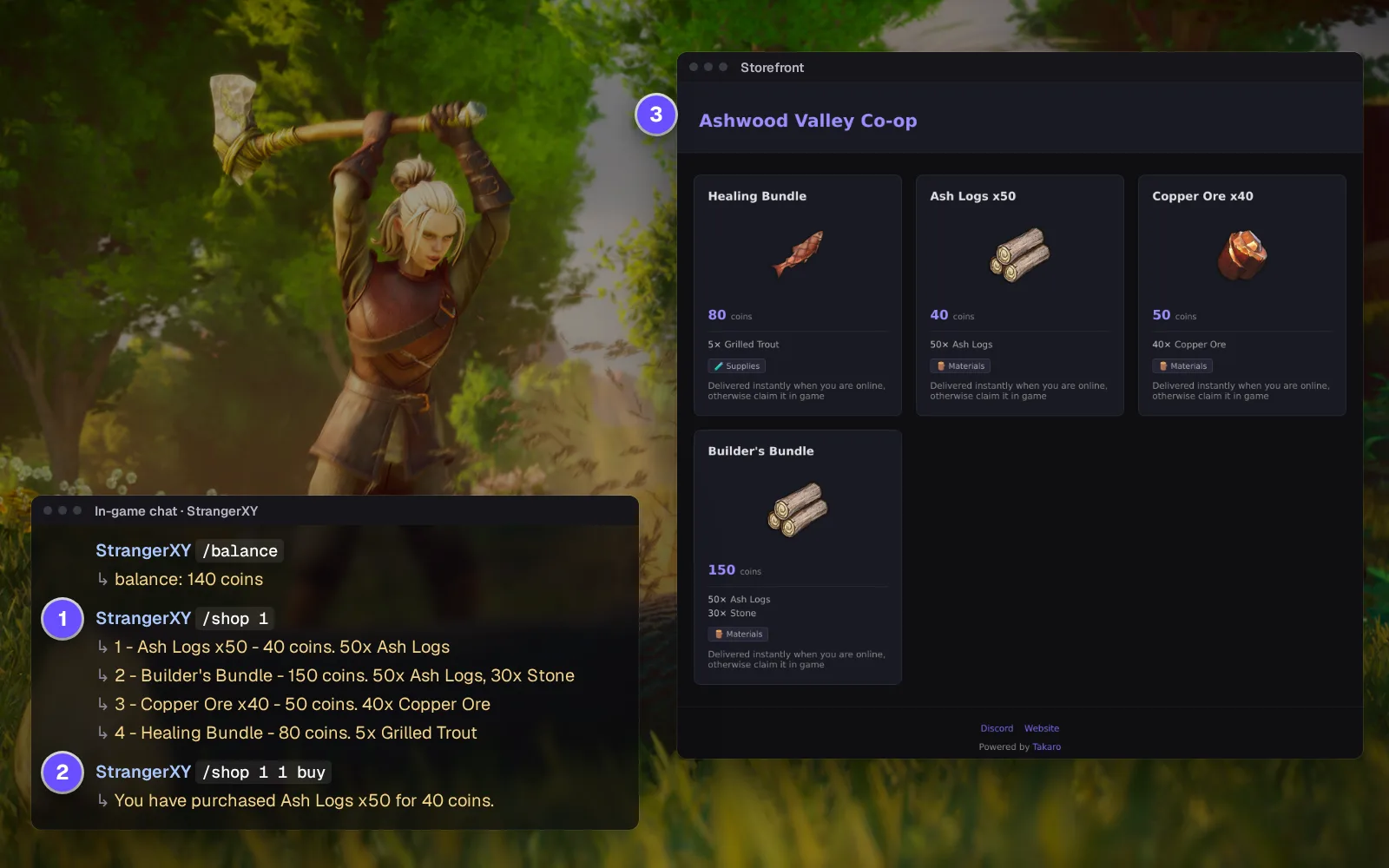
Everything else for your RuneScape: Dragonwilds server
One login per moderator
Each moderator gets their own Takaro account with only the rights you give them. Removing one doesn't mean a new password for everyone.
Timed bans that lift themselves
Ban for three days or for good; the ban list shows when it ends. A banned player is dropped about a second after joining.
Hand back what a griefer took
Give any item by its in-game name. It appears in the inventory without a relog.
Teleports players set themselves
Each player saves a spot with @settp, like the house by the lake, and returns with @tp.
Download the RuneScape: Dragonwilds connector
Native connector for a RuneScape: Dragonwilds Linux dedicated server.
Before you start
- Takaro registration token
- Control of the Dragonwilds Linux dedicated server startup command
Latest release
Next steps
- Create the server in the Takaro dashboard and copy its registration token.
- Download the connector, paste the code Takaro gives you into its settings file, and add it to your server's launch line.
Free to start. Upgrade when you grow.
The free tier includes one server with all modules, full API access, and Discord integration. Paid plans start at €7.99/month.
RuneScape: Dragonwilds server management FAQ
Does Dragonwilds have RCON or admin commands?
No. Dragonwilds has no remote console and no chat commands; admin happens in the in-game Server Management screen. Takaro's connector adds its own commands, so kicks, bans, messages and teleports work from the dashboard.
Who can unban a player on a Dragonwilds server?
In the game, only the Owner, from inside the game. Admins with the password can ban online players but can't unban anyone. In Takaro, any staff member with ban rights can unban from the dashboard, and it works straight away.
How do I stop strangers griefing a public Dragonwilds world?
If the world doesn't need to be public, set a World Password. If it does, Takaro's event history shows who joined and when, and your staff can ban from the dashboard without waiting for the Owner.
Why did my Dragonwilds server disappear from the server list?
Usually it's still on the old build after a hotfix. Client and server must run the same version, so update and restart it. Takaro normally needs nothing after a game update; if one part stops working, the rest carries on.
Does Takaro work with a Windows Dragonwilds server?
No. The connector needs the Linux dedicated server, which Dragonwilds ships natively.
Do my Dragonwilds players need a mod to join?
No. The connector runs only on the server; players launch Dragonwilds as usual and join.
Is there a player map for Dragonwilds?
Not out of the box: Dragonwilds ships no map image for servers. The connector places every player on one world frame, so once you upload a map image, Takaro's Map page shows online players on it. Without one, the event history shows who was online and when.
Can I manage multiple RuneScape: Dragonwilds servers from one dashboard?
Yes. Add as many servers as your plan allows. The free tier includes one server; paid plans cover two to eight, all from a single dashboard.
Is Takaro a replacement for my server host?
No. Takaro is a management layer on top of the server you already run. You keep your hosting provider; Takaro connects to the server and adds economy, teleports, moderation and analytics.
Can I write custom modules?
Yes. Takaro modules are commands, hooks and cron jobs you can write yourself, and the REST API is open for anything a module cannot reach.
How much does it cost?
The free tier covers one server with every module included. Paid plans start at €7.99/month for two servers. See all plans.
Is RuneScape: Dragonwilds support official?
Yes. Takaro builds, tests and releases this connector itself, with versioned releases and a documented install. Bugs go to the connectors repository.
Ready to manage your RuneScape: Dragonwilds server?
Install the connector, connect, and start adding features in minutes.
Running more than one game?
One Takaro account runs every game below, with one player profile across all of them.