
Dune: Awakening self-hosted server tools for the people on your battlegroup
Your battlegroup is finally up; now come the players. Pick anyone and replay their night on Hagga Basin: where they went, what they killed and what they carried before and after. Then kick, ban and talk to them from the browser, with players installing nothing.
The map, replay, live positions and kills need the optional server plugin.
- Free for one server, with every module
- A connector next to the battlegroup. Players install nothing
- Picks itself back up after network, server or connector restarts
Your battlegroup is up. Now come the players.
"Who is that?"
A name nobody in the group knows is building next to your base. Funcom's tools say the servers are healthy; they don't say who that is.
With Takaro Kick, then ban for a week or for good. The ban is checked every time they try to join.
"Who was near our base last night?"
A friend logs in to a stripped storage room and the group chat starts guessing.
With Takaro Draw a box round the base on Hagga Basin, set the night, and read who was inside and when (with the optional plugin).
"Is the server dead?"
You took the map servers down for a Funcom patch, and the friends who were offline found out by failing to connect.
With Takaro Post the warning on screen and to Discord before you start, and let joins show up in Discord when it's back.
"Who is that?" A name nobody knows, next to your base
The guides for a self-hosted battlegroup cover setup, not moderation, and the join password is the only gate. In Takaro you (1) find the name on the Players list, (2) write down why and pick when the ban ends, a week or for good, and (3) press Ban player. The connector checks bans every time someone joins, so it holds after they've logged off.
How bans work →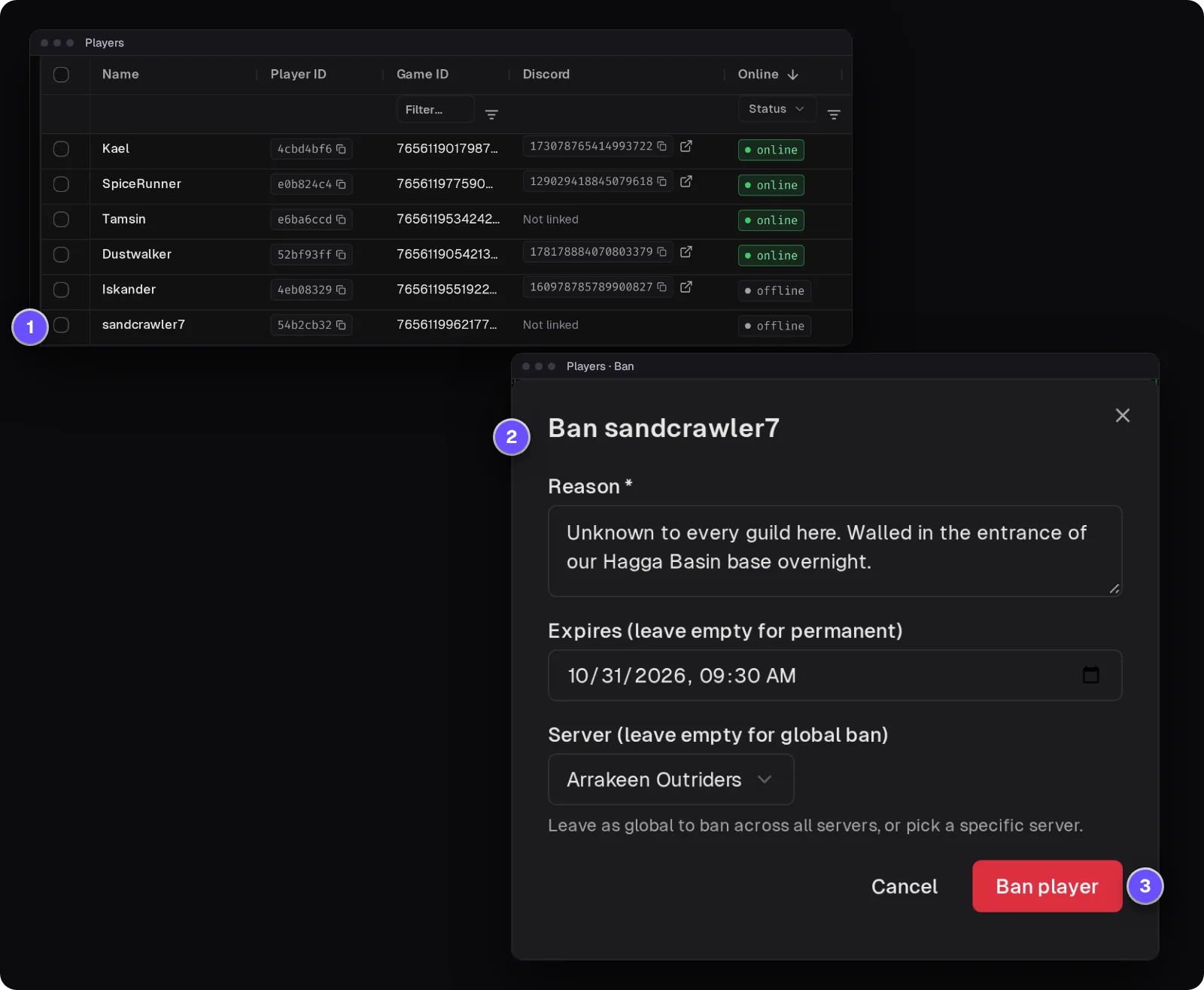
Who was at your base between 2 and 4 AM?
Put a box over the base in Hagga Basin on the Tracker, the map's history view, and pick the hours (this needs the optional plugin). Area search lists every player seen inside with the first and last time; the Theft tab lists what they gained there, here Spice Melange and Plastanium. That's strong evidence, not proof: inventories are compared at intervals, and an item can change hands legitimately.
How area search and Theft work →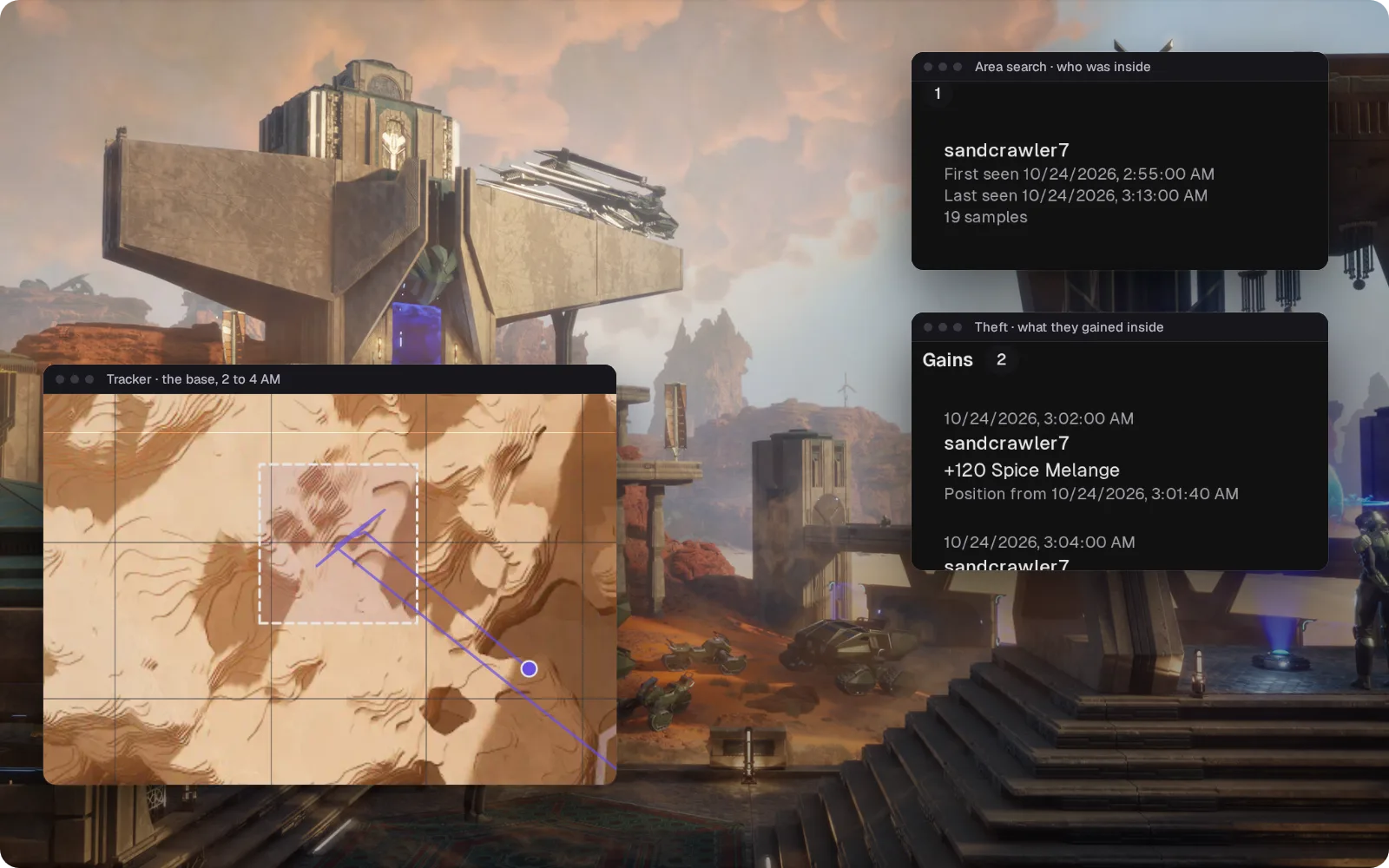
One player's night, in order
Filter the server's events to one player: when they joined, what they said, what they bought, which NPCs they killed and with which weapon, how they died and when they left. Kills and their weapons come from the optional plugin.
How the Tracker works →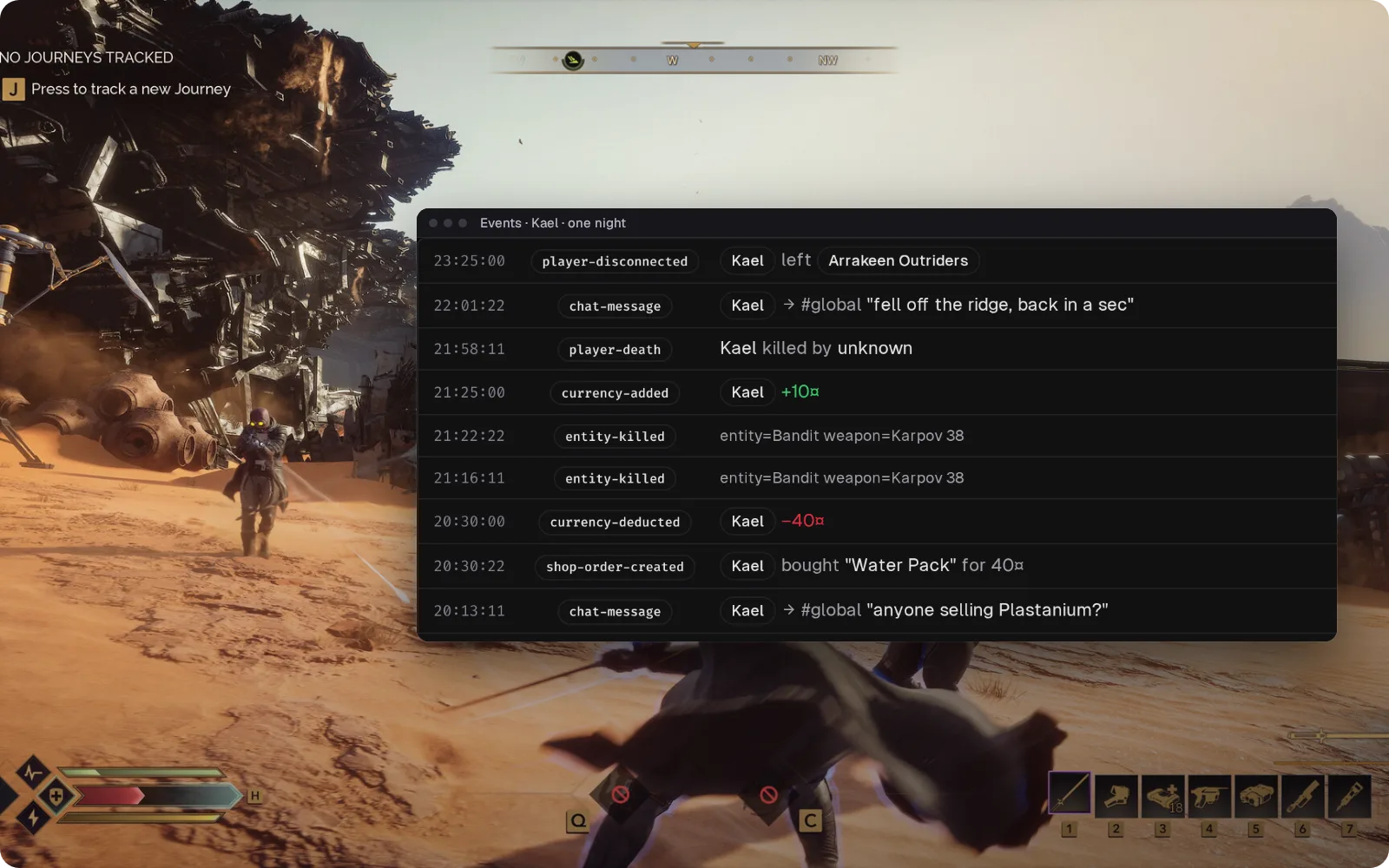
Answer "is the server dead?" from Discord
Game chat goes to a Discord channel you pick, and what your staff type there shows up in game with a [D] in front of the name. Joins, leaves and scheduled messages post too, so the friends who were offline know when the map servers are back.
Set up the Discord bridge →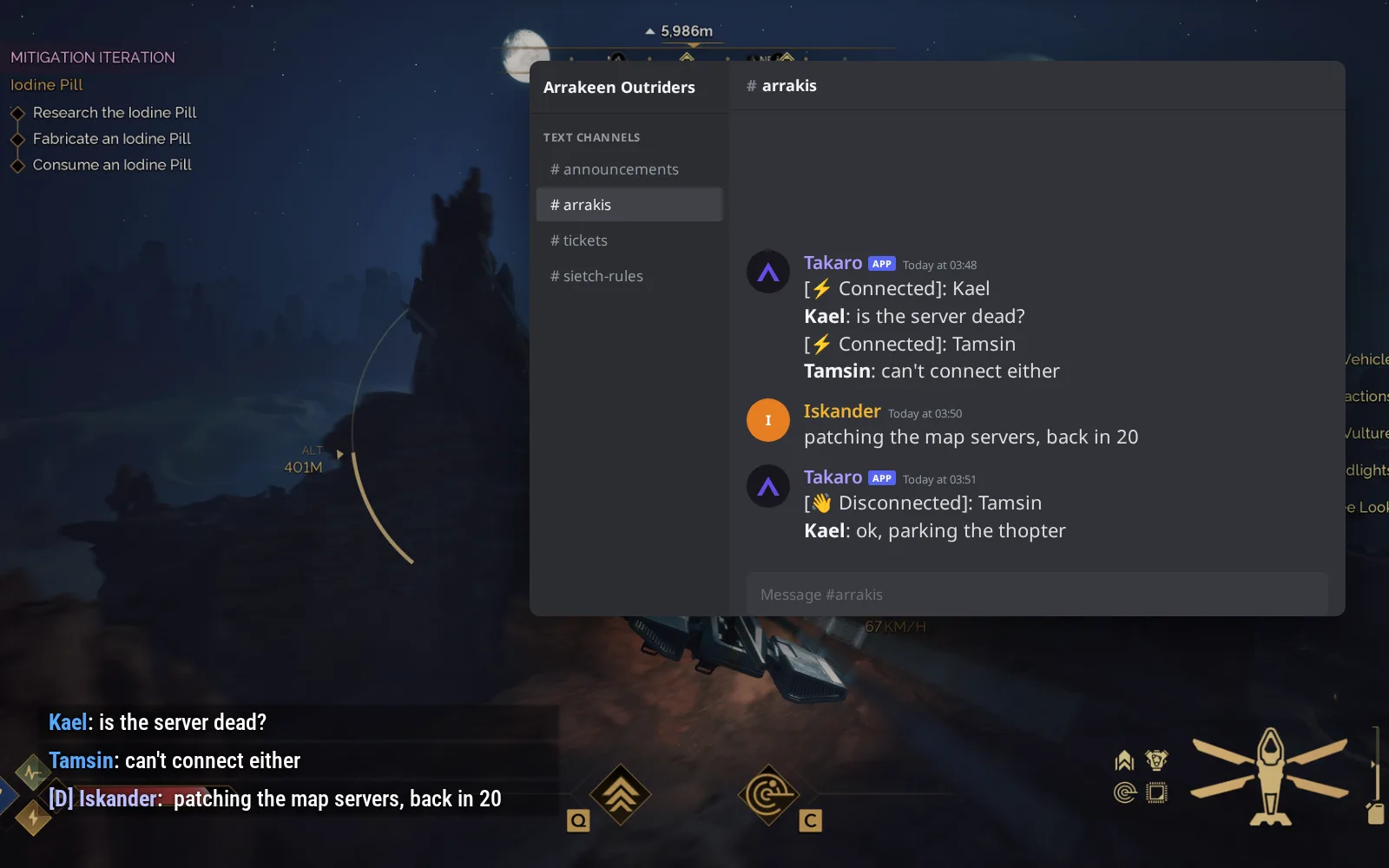
Water for the newcomers, bought with scrip
New players get your welcome message and a starter kit when they join, and orders placed while offline wait for them. (1) /shop 1 lists water, kits and materials priced in scrip. (2) /shop 1 5 buy delivers a Water Pack. (3) Your storefront page lists the water, kits and materials as cards priced in scrip.
Browse the economy modules →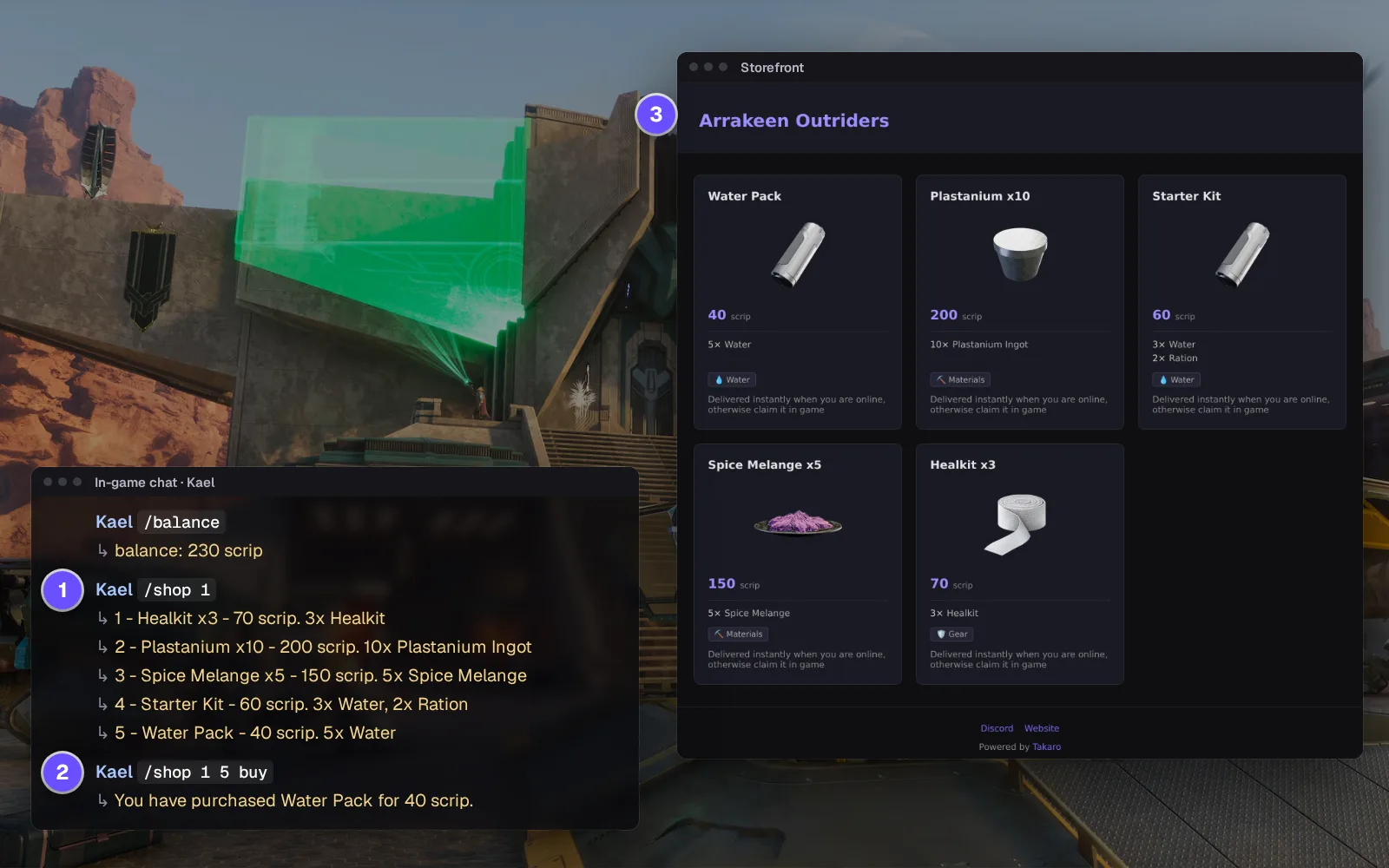
Everything else for your Dune: Awakening server
Bans checked on every join
Timed or permanent, enforced by the connector when a player connects. Expired bans drop off the list on their own.
Give items by display name
Pick from the item catalogue built during install. Items arrive without a relog.
Pull a stuck player out
Teleport a player to coordinates from the browser; their position is read again after the move.
Console commands with clear failures
Run the connector's commands from the browser. An unknown command says so instead of failing silently.
Download the Dune: Awakening connector
Sidecar for a self-hosted Dune: Awakening battlegroup, with an optional native plugin.
Before you start
- Takaro registration token
- Self-hosted battlegroup with a Funcom self-hosting token
- AVX2 CPU and ~16 GB RAM for one map server
- Docker Compose or Node.js 22 with access to the battlegroup's Postgres and game RabbitMQ
Latest release
Next steps
- Create the server in the Takaro dashboard and copy its registration token.
- Add your server in Takaro, run the Dune: Awakening connector next to your battlegroup with Docker or Node.js, and paste in the code Takaro gives you.
Free to start. Upgrade when you grow.
The free tier includes one server with all modules, full API access, and Discord integration. Paid plans start at €7.99/month.
Dune: Awakening server management FAQ
Does Takaro work on official or rented Dune: Awakening servers?
No. It works with self-hosted battlegroups only, because the connector has to run next to the battlegroup and read its game data.
How do I ban a player from my self-hosted Dune: Awakening server?
Open the player in Takaro and ban them, for a set time or permanently. The ban is checked whenever they try to join, and you can lift it from the same ban list.
Can I see where players are in Hagga Basin?
Yes, on Hagga Basin. With the optional server plugin you get live positions, and the Tracker replays where players went. Without it, you see each player's last saved position. You upload the Hagga Basin map image once.
What do I need to self-host Dune: Awakening with Takaro?
A battlegroup running from Funcom's self-hosting tool with your self-hosting token, a CPU with AVX2, and about 16 GB of free memory for each map server. Takaro's connector runs beside it with Docker or Node.js.
Can I post Dune: Awakening server events to Discord?
Yes. Game chat goes to a Discord channel and back, and joins, leaves and your scheduled messages post there as well.
What happens when Dune: Awakening updates?
Check the connector releases first, and update once a release for the new server build is published. If an update breaks part of the plugin, only that part switches off and the rest keeps working.
Do my players install anything?
No. Everything runs on your side of the battlegroup, and players join with the normal game.
Can I manage multiple Dune: Awakening servers from one dashboard?
Yes. Add as many servers as your plan allows. The free tier includes one server; paid plans cover two to eight, all from a single dashboard.
Is Takaro a replacement for my server host?
No. Takaro is a management layer on top of the server you already run. You keep your hosting provider; Takaro connects to the server and adds economy, teleports, moderation and analytics.
Can I write custom modules?
Yes. Takaro modules are commands, hooks and cron jobs you can write yourself, and the REST API is open for anything a module cannot reach.
How much does it cost?
The free tier covers one server with every module included. Paid plans start at €7.99/month for two servers. See all plans.
Is Dune: Awakening support official?
Yes. Takaro builds, tests and releases this connector itself, with versioned releases and a documented install. Bugs go to the connectors repository.
Ready to manage your Dune: Awakening server?
Install the connector, connect, and start adding features in minutes.
Running more than one game?
One Takaro account runs every game below, with one player profile across all of them.