Rust server manager and admin tools that remember what every player did
Pick any player on your Rust game server and replay their evening on its own map: where they went, which NPCs they killed, when they died and what was in their inventory around then. The next raid ticket, group-limit report or cheating claim starts from that record, not from who shouts loudest.
Tested on Carbon, written for Oxide.
- Free for one server, with every module
- One plugin on the server. Players install nothing
- Reconnects by itself after the server restarts
Tickets every Rust admin knows
"We got offlined Saturday night"
No video, three suspects, and two clans already arguing in your Discord. Without a record of who was there, any call you make looks like favouritism.
With Takaro Draw a box around their base for Saturday night and read who was seen inside, from when to when.
"That solo is running with a trio"
Group limits are the hardest rule to police. Most teamers stay out of the team menu; they just farm, roam and raid side by side, and deny it in the ticket.
With Takaro Play back the evening for those players and judge for yourself whether their trails move together. Takaro doesn't flag teams; you make the call.
"He walked straight to my hidden base"
A cheating claim with nothing behind it. You can't see what anti-cheat saw, so you need to know where that player actually went.
With Takaro Replay their trail hour by hour, then kick or ban with a reason from the browser.
Everything one player did, in order
Filter the server's events to one player and read their evening top to bottom: when they joined, what they said, which NPCs they killed, what they earned and bought, who killed them and when they left. It's the first thing to open when their name comes up in a ticket.
How the Tracker works →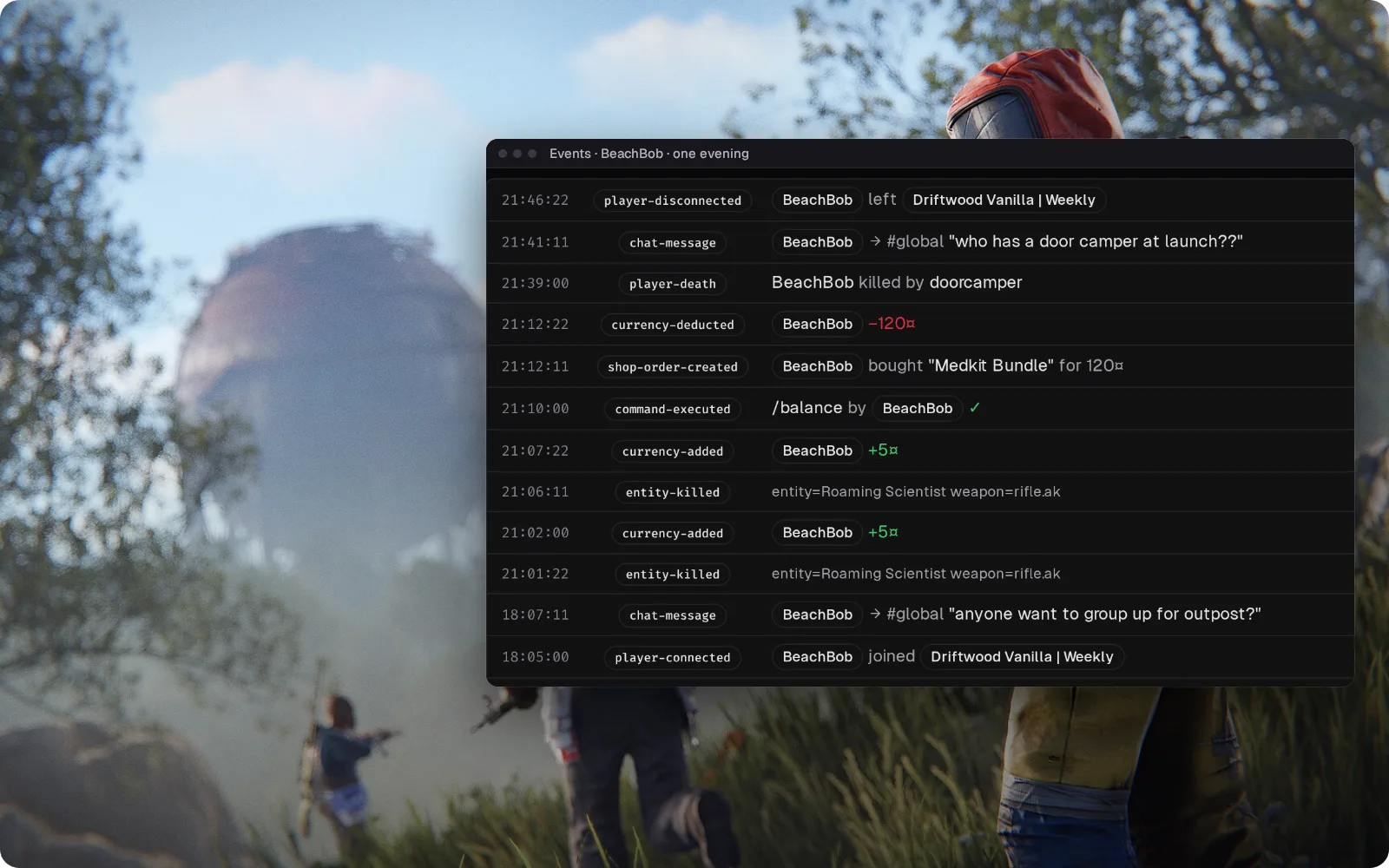
Who raided that base? See who was there from 02:00 to 04:00
Draw a box around the raided base on the Tracker, set the hours, and get every player seen inside with the first and last time. The Theft tab lists what they gained while in there: strong evidence, not proof, because Rust doesn't say where an item came from. Positions are samples about 30 seconds apart, so check the trail before you ban.
How area search and Theft work →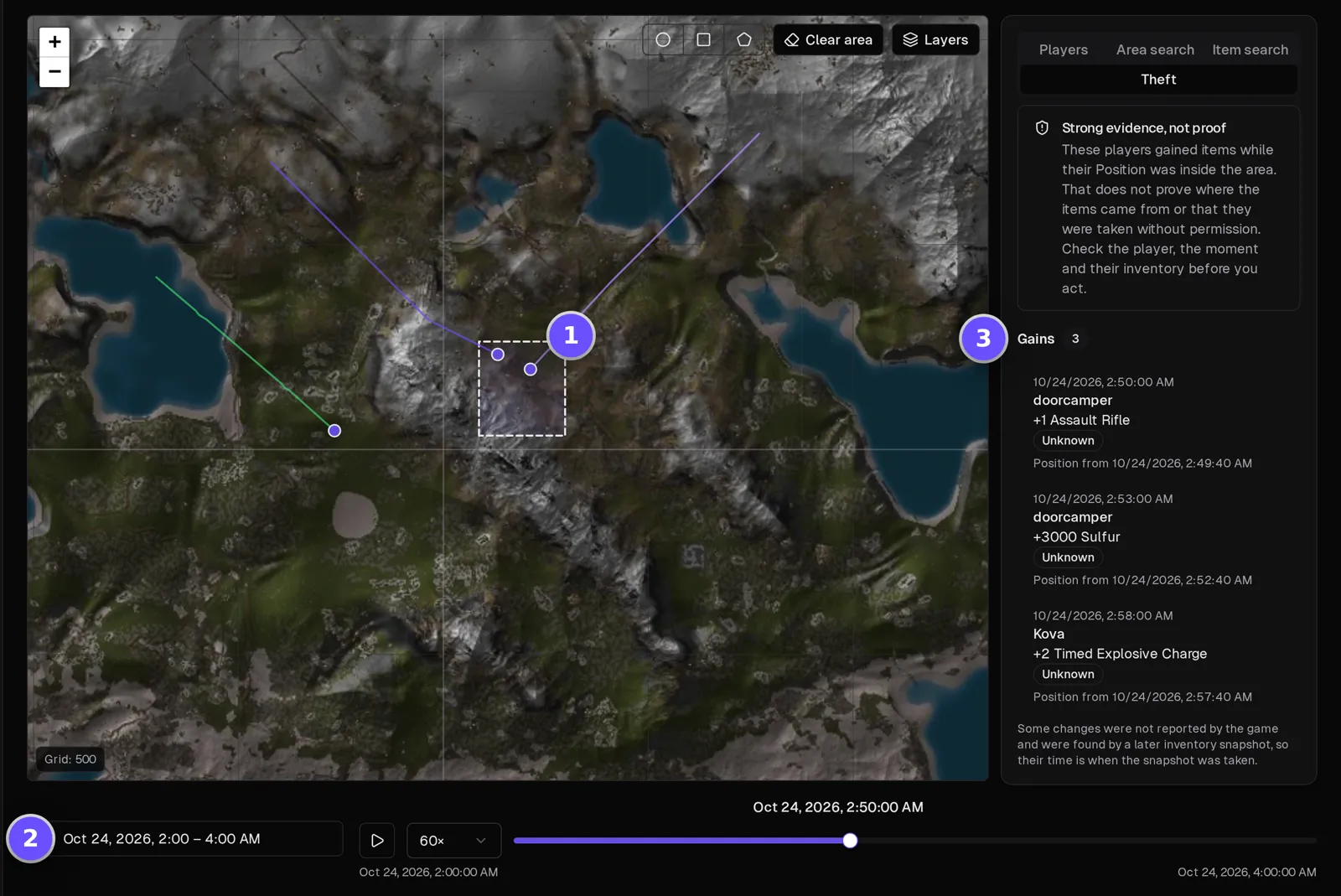
Wipe day on autopilot
Takaro doesn't wipe the map for you, but it handles the evening around it. Scheduled messages remind players of the wipe time all week, a timed shutdown warns them five minutes ahead and saves and stops the server at the time you set, and when your host brings it back the plugin reconnects by itself. Every returning player gets your welcome message, and each step lands in the server's event log.
Browse the modules →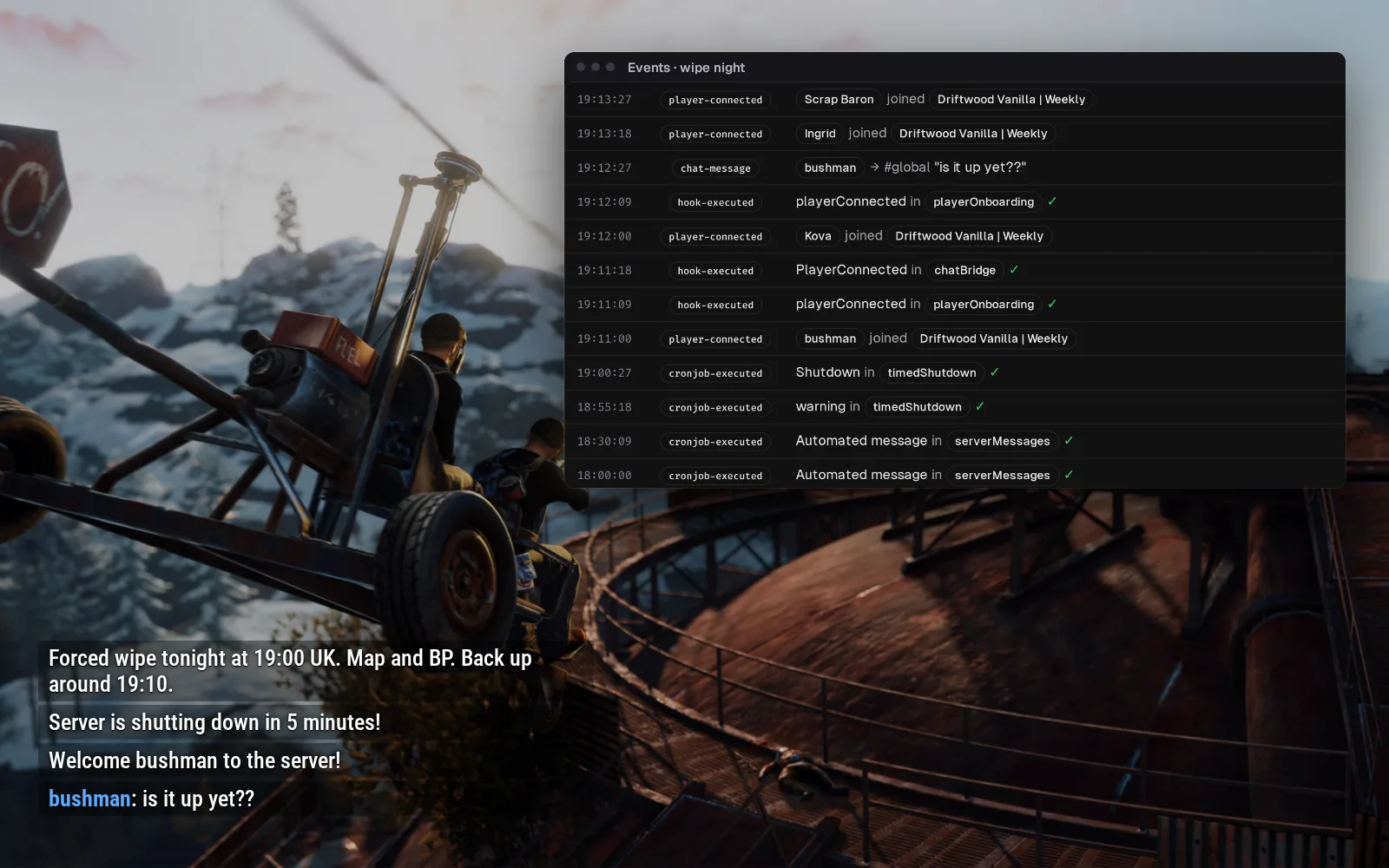
Answer "is it up yet?" from Discord on wipe night
Game chat lands in a Discord channel you pick, and what you type there shows up in game with a [D] in front of your name. Joins are posted too, so you watch the server fill after a wipe while you're still checking plugins.
Set up the Discord bridge →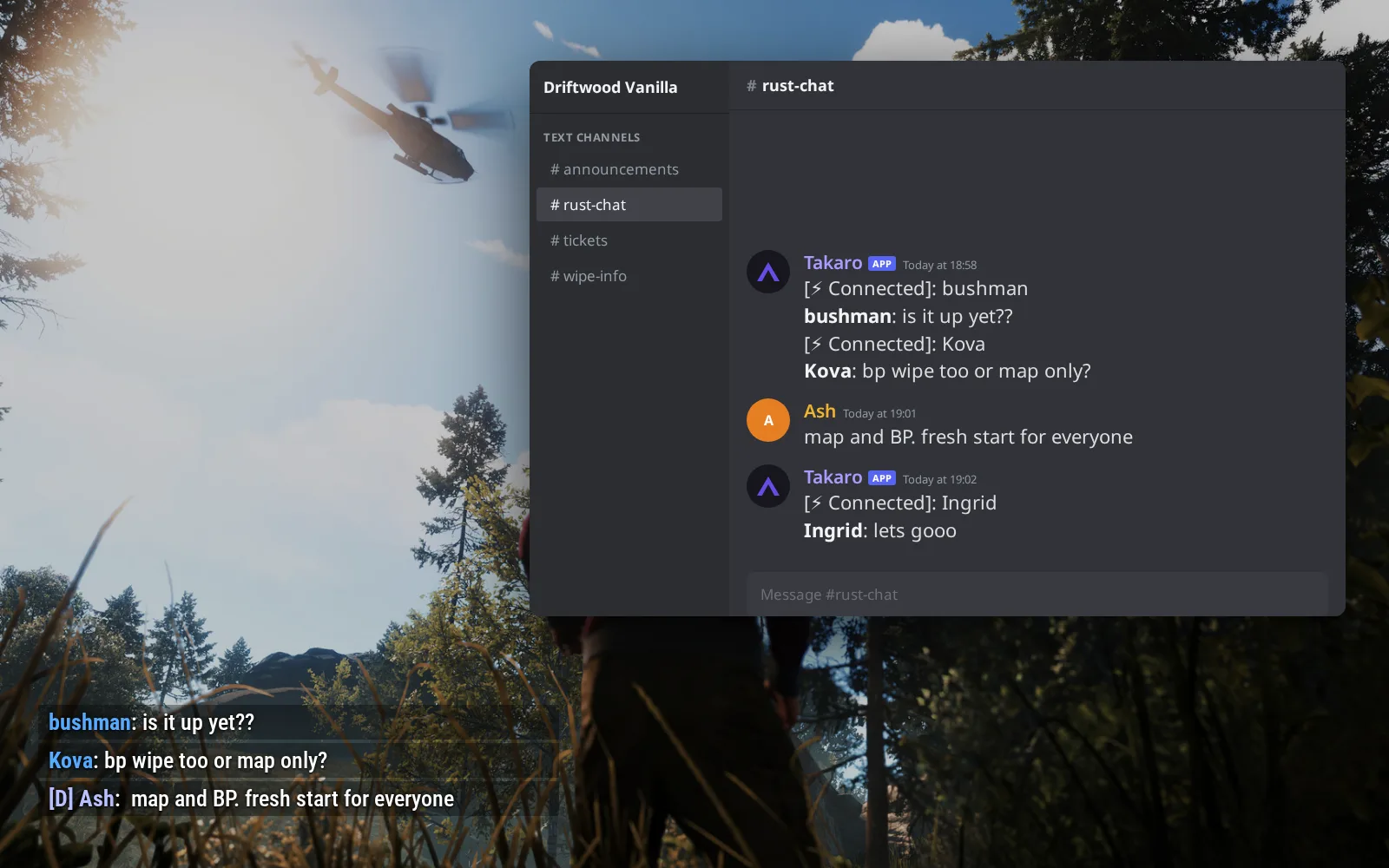
Coins for every NPC kill, spent in your shop
Killing NPCs, like the scientists guarding monuments, or animals such as bears and wolves earns your server's currency at one rate you set. (1) /shop 1 lists five of your listings with price and contents. (2) /shop 1 2 buy puts the Medkit Bundle straight into the inventory, or at their feet when it's full. (3) The same kits sit on your server's storefront page as cards a player can read before the wipe.
Browse the economy modules →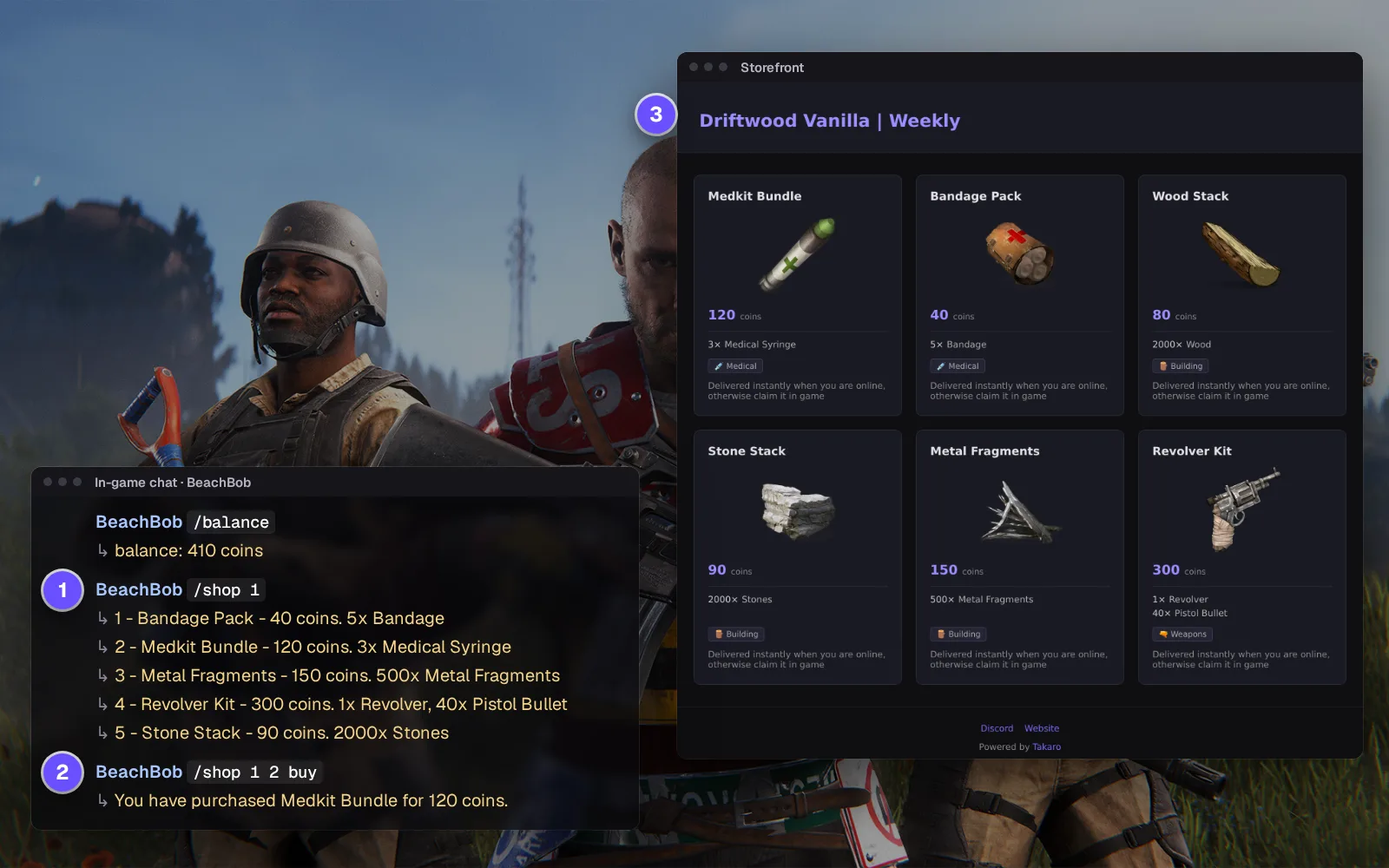
Your regulars survive the wipe, even if their bases don't
Everyone who has joined stays on one list with their Steam ID, playtime and when they were last on, and none of it resets when the map does. Players who link Discord show up with their Discord account, so a report in your ticket channel points at the right person.
How the Discord bridge works →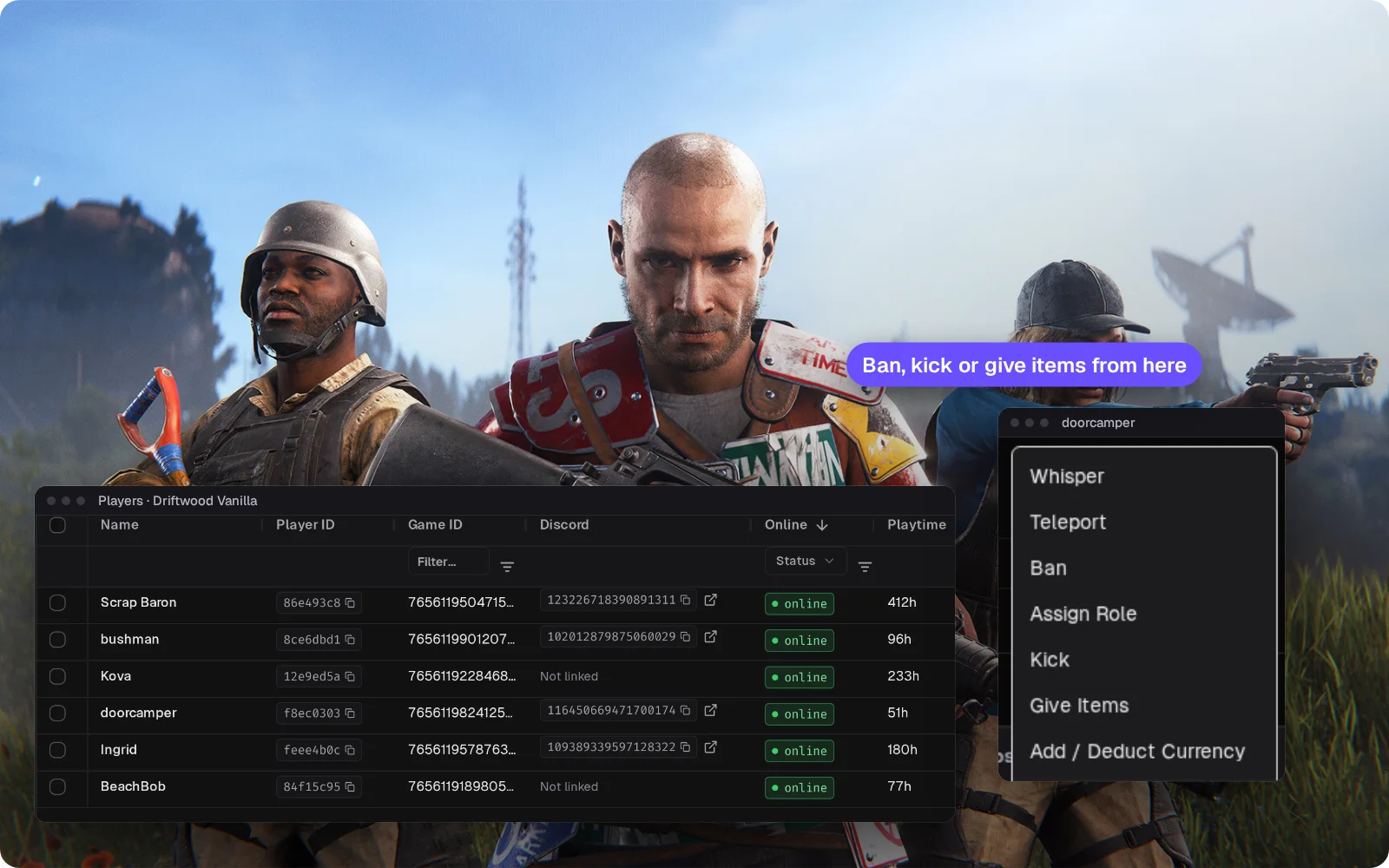
Everything else for your Rust server
Timed bans that lift themselves
Ban from the player's profile instead of typing a Steam ID into F1. Timed bans end on their own; permanent bans go into the server's own ban list. Unban with one click.
Give items by their real name
Search "Assault Rifle", not rifle.ak. The item lands in the player's inventory, or at their feet if it's full. Handy when a bug ate someone's kit right after wipe.
The console, without joining
Run console commands and read the output, or move a player to exact coordinates, all from the browser.
Teleports players set themselves
Players save their own spots with /settp and go back with /tp, so nobody asks an admin for a ride home after wipe.
Download the Rust connector
Server-side plugin for Carbon and Oxide/uMod Rust servers.
Before you start
- Carbon or Oxide/uMod
- Access to the server's plugin and config folders
- Takaro registration token
Latest release
Next steps
- Create the server in the Takaro dashboard and copy its registration token.
- Put the TakaroConnector plugin in your Carbon or Oxide plugins folder, then paste the code Takaro gives you into its config file. It connects within seconds.
Free to start. Upgrade when you grow.
The free tier includes one server with all modules, full API access, and Discord integration. Paid plans start at €7.99/month.
Rust server management FAQ
Is there a web control panel for a Rust server?
That's what Takaro is: a web admin panel with bans, kicks, items, chat, console and the live map in one browser tab, on the server you already run, whoever hosts it. If your group also hosts Valheim, it sits in the same dashboard.
Can I see a log of what a player did on my Rust server?
Yes. Filter the Events page to that player to see their joins, chat, kills of scientists and animals, deaths, purchases and currency changes in order. The Tracker adds where they went and what they carried.
Does Takaro work with Oxide and Carbon?
It runs on Carbon, where we test it. It is written for Oxide's plugin system, but we haven't run it on an Oxide server.
Do players need Oxide or Carbon on their side?
No. The plugin runs on the server only. Players join the way they always do.
Is there a live map for a Rust game server?
Yes. Open the Map page for your server in Takaro: it shows players online on your world map, plus where offline players logged out.
How do I find out who raided a base on my Rust server?
Switch the map to Tracker, set the hours of the raid and draw around the base. Takaro lists who was seen inside and when, and the Theft tab shows who gained items there: strong evidence, not proof. It works as a raid log you open after the ticket comes in.
How do I ban or unban a player on a Rust server without RCON?
Open the player in Takaro and ban them for a set time or for good. A timed ban ends on its own, and unbanning is one button, so nobody has to hunt through a ban file or type RCON commands. See how bans work.
What happens to Takaro on force wipe?
The plugin reconnects on its own after the server restarts. On the first start of a new map, the server pauses while it draws the map; expect longer on bigger maps. A force wipe comes with a new Rust build; the connector's release notes say which build it was tested on.
Can I chat with my Rust server from Discord?
Yes. Game chat lands in a Discord channel you pick, and what you write there shows up in game, so you can answer players without joining the server.
Can I manage multiple Rust servers from one dashboard?
Yes. Add as many servers as your plan allows. The free tier includes one server; paid plans cover two to eight, all from a single dashboard.
Is Takaro a replacement for my server host?
No. Takaro is a management layer on top of the server you already run. You keep your hosting provider; Takaro connects to the server and adds economy, teleports, moderation and analytics.
Can I write custom modules?
Yes. Takaro modules are commands, hooks and cron jobs you can write yourself, and the REST API is open for anything a module cannot reach.
How much does it cost?
The free tier covers one server with every module included. Paid plans start at €7.99/month for two servers. See all plans.
Is Rust support official?
Yes. Takaro builds, tests and releases this connector itself, with versioned releases and a documented install. Bugs go to the connectors repository.
Latest about Rust
All Rust posts →- Takaro 2.1: see who was there, and what they took Takaro 2.1 adds the Tracker to your server's Map: replay where players went, search an area for who was inside and see what they picked up.
- How to Set Up Cross-Server Teleports in Takaro Step-by-step guide to setting up teleport modules across your game servers. Works for Rust, 7D2D, and Minecraft.
Ready to manage your Rust server?
Install the connector, connect, and start adding features in minutes.
Running more than one game?
One Takaro account runs every game below, with one player profile across all of them.