
Palworld server manager that warns your players before every scheduled restart
Palworld servers need regular restarts, and someone always gets dropped mid-capture. Takaro warns everyone in game, saves and stops the server on your schedule, and keeps a log of who was on when the Palbox got smashed last night.
Community-maintained bridge. Chat needs its Windows-only mod. Free tier available.
- Free for one server, with every module
- A bridge program next to the server. Players install nothing
- Palworld next to your other games, in one dashboard
Tickets every Palworld admin knows
"The server kicked me mid-capture"
The scheduled restart nobody announced, and a Giga Sphere wasted on a Pal that never got caught.
With Takaro A warning in game chat on a schedule, then Takaro saves and stops the server; the host's schedule or your start script starts it again.
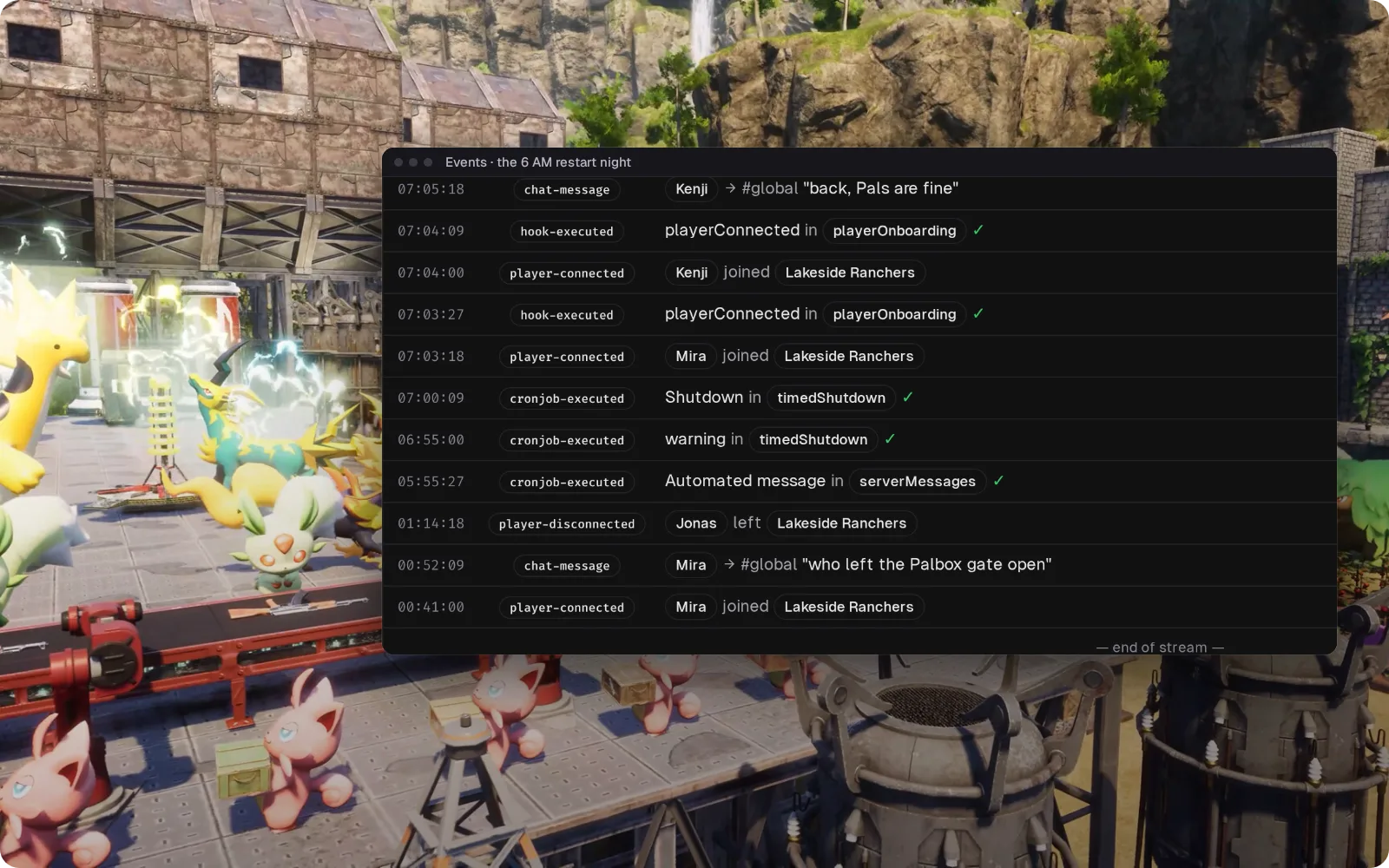
"Our Palbox got smashed overnight"
Someone joined the guild, wrecked the base and logged off. By morning the owner wants a name.
With Takaro Read the night's joins and leaves in order and ban from the browser. Takaro doesn't say who broke it; you judge from who was on.
"Which ID do I ban?"
/ShowPlayers, copy the ID, hope it's the right row, and work out what to do with the crossplay player who has no Steam ID.
With Takaro Ban from the player's profile by name. Palworld has no ban expiry, so Takaro lifts timed bans itself.
The 06:00 restart, with a warning first
Memory creeps up, so the server needs a restart every few hours, and nobody wants to be kicked mid-capture. (1) The timed shutdown posts a warning in game chat five minutes ahead. (2) At 06:00 Takaro saves the world and stops the server; your host or start script brings it back. (3) Players are back three minutes later, and every step is in the event log. All of it works without the chat mod, on Linux too.
Browse the modules →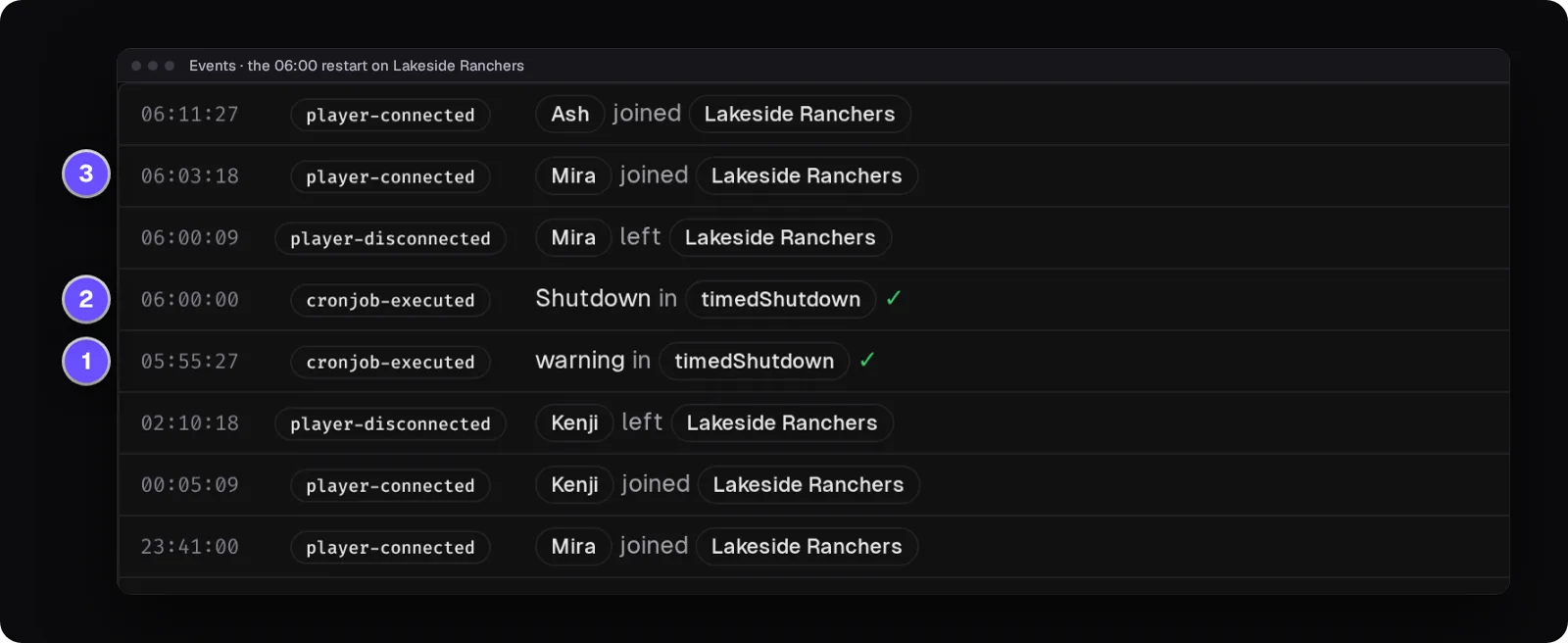
Ban by name, crossplay players included
Everyone who has joined stays on one list with their ID, playtime and when they were last on. Open a player to kick, ban for a set time or for good, or unban; the ban list shows the bans you made from Takaro.
How bans work →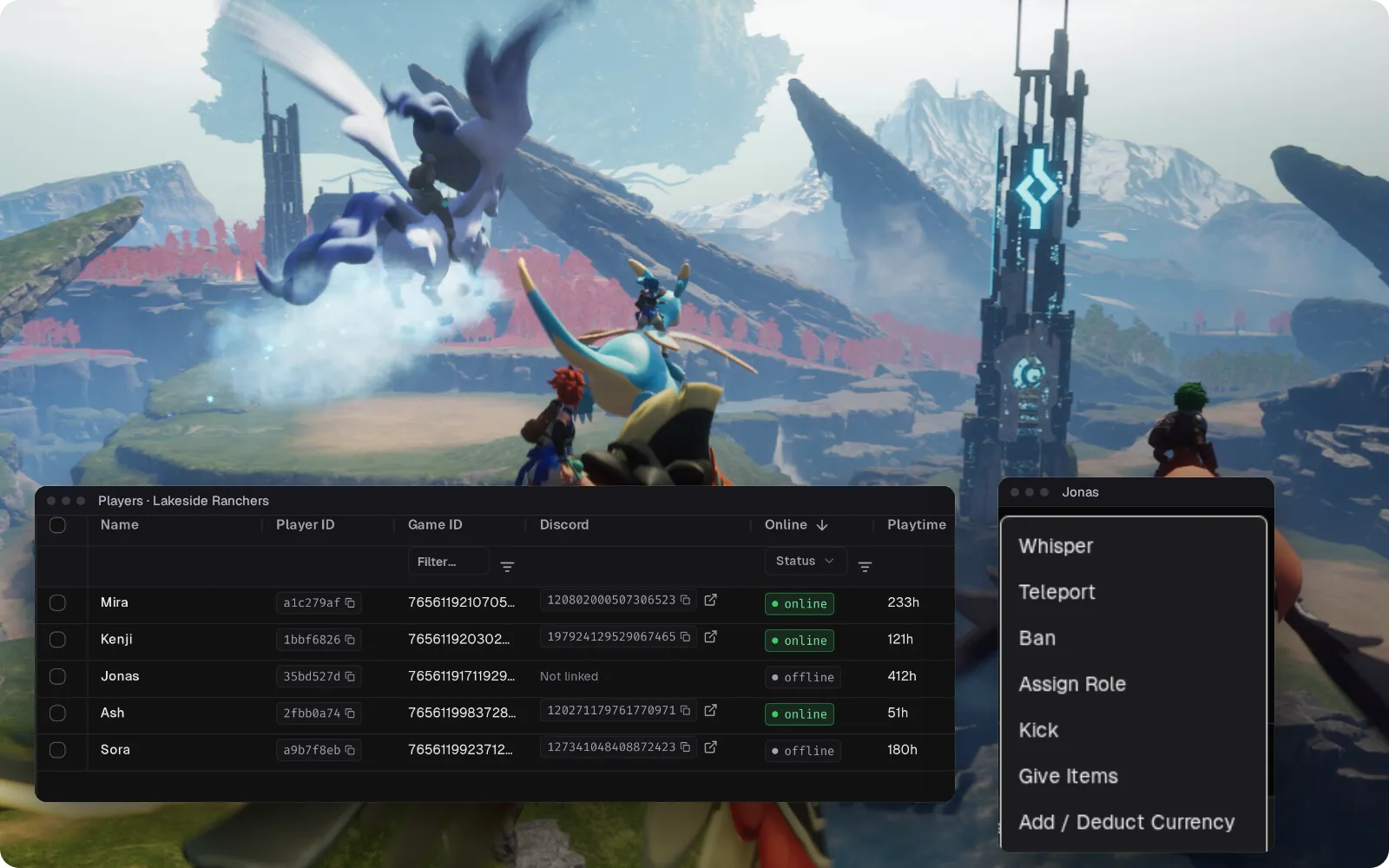
One rancher's night, from join to logout
Joins and leaves arrive without any mod. With the bridge's chat mod on a Windows server, the log also shows Global and Guild chat and deaths, so one player's night reads top to bottom.
How community game support works →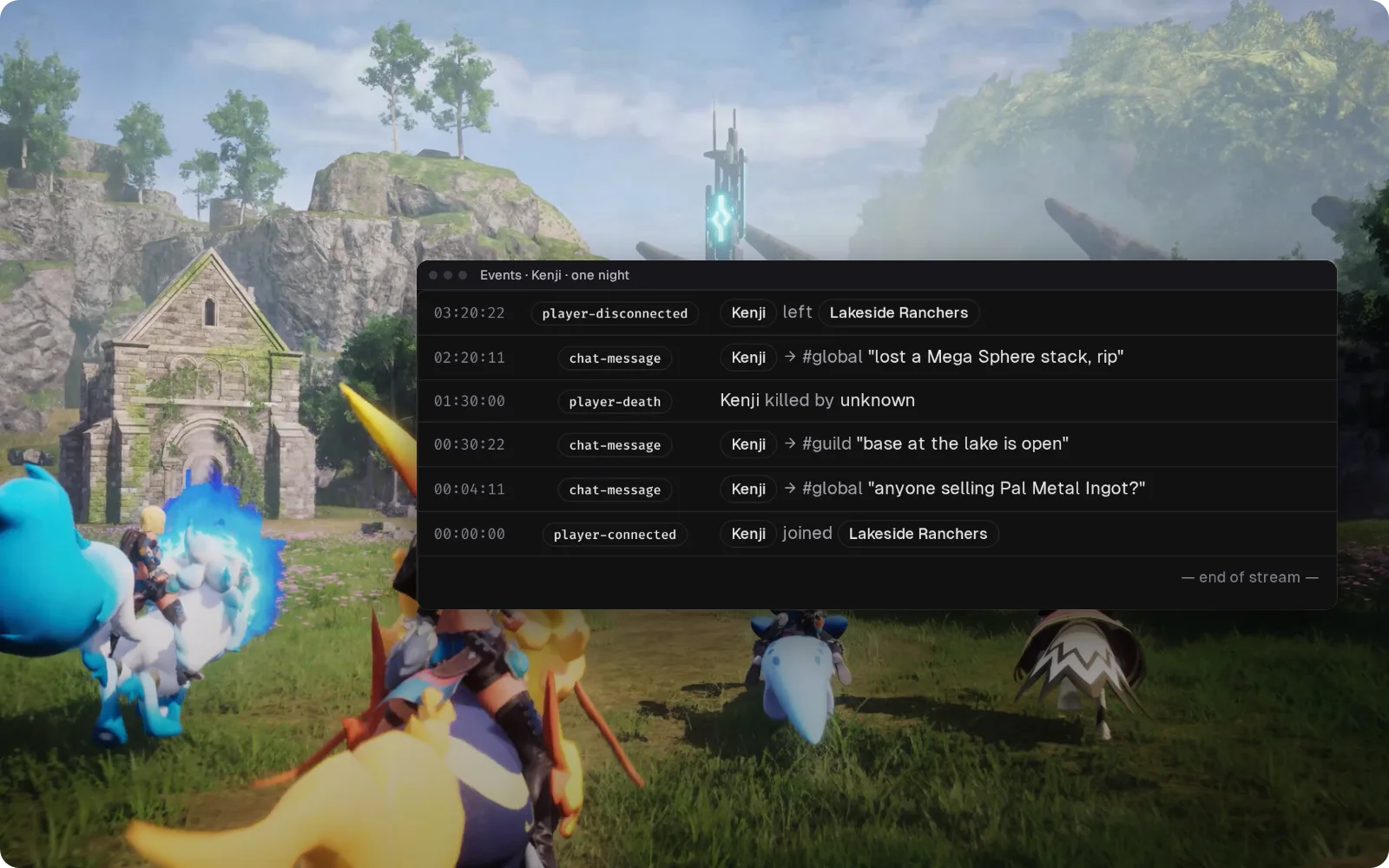
Global chat in Discord, with the chat mod
With the bridge's chat mod installed, Global chat goes to a Discord channel and your replies come back in game, so "is the 06:00 restart still on?" gets an answer without joining the server. The chat mod runs on UE4SS, which only works on Windows Palworld servers, so a Linux server can't bridge chat.
Set up the Discord bridge →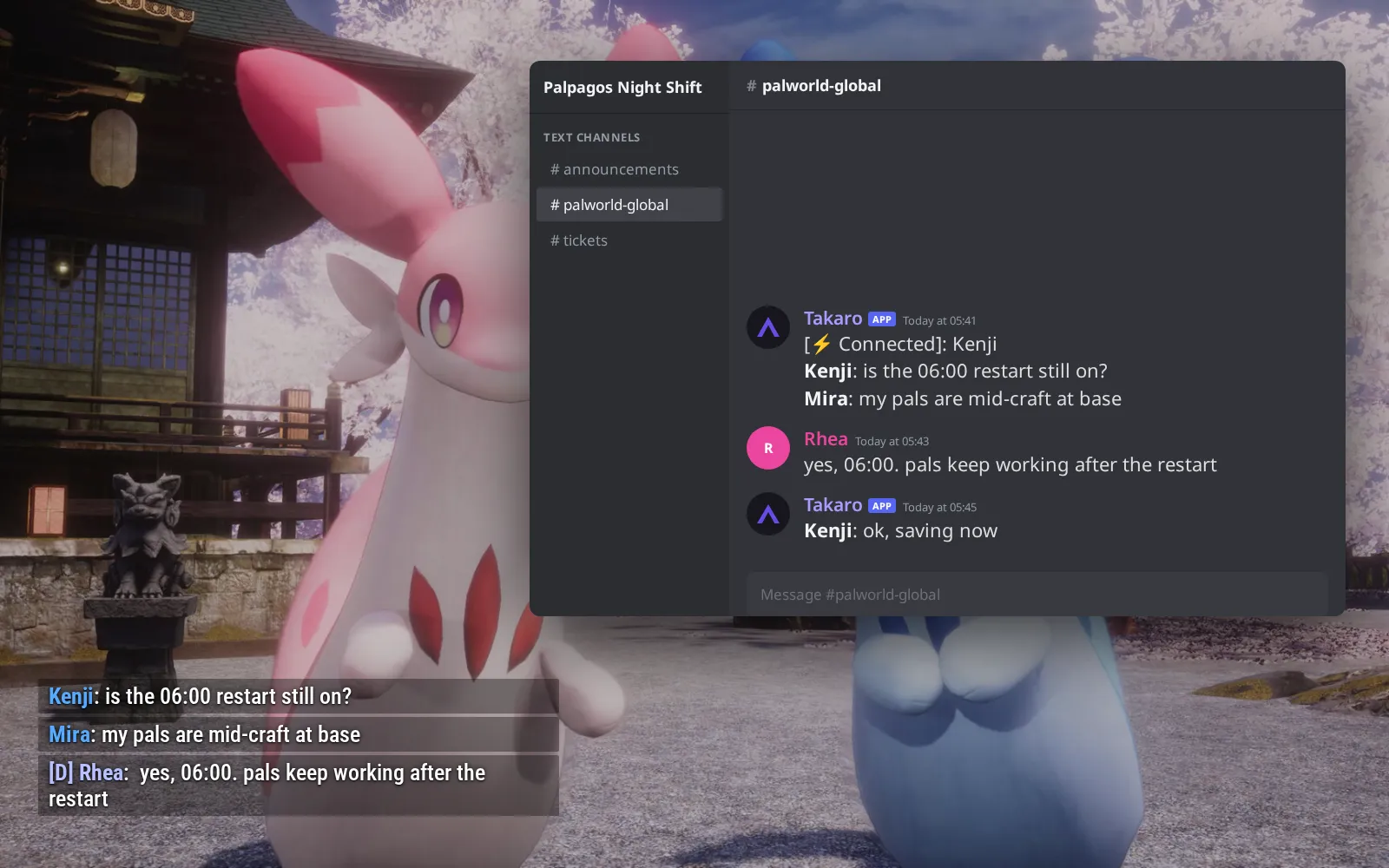
Pal Spheres for a daily streak
On a Windows server with the chat mod, players earn coins from /daily streaks and spend them in chat; without the mod there's no in-game shop. (1) /shop 1 lists spheres, food and materials. (2) /shop 1 2 buy delivers ten Mega Spheres. (3) The spheres, food and materials also appear as cards on your server's storefront page.
Browse the economy modules →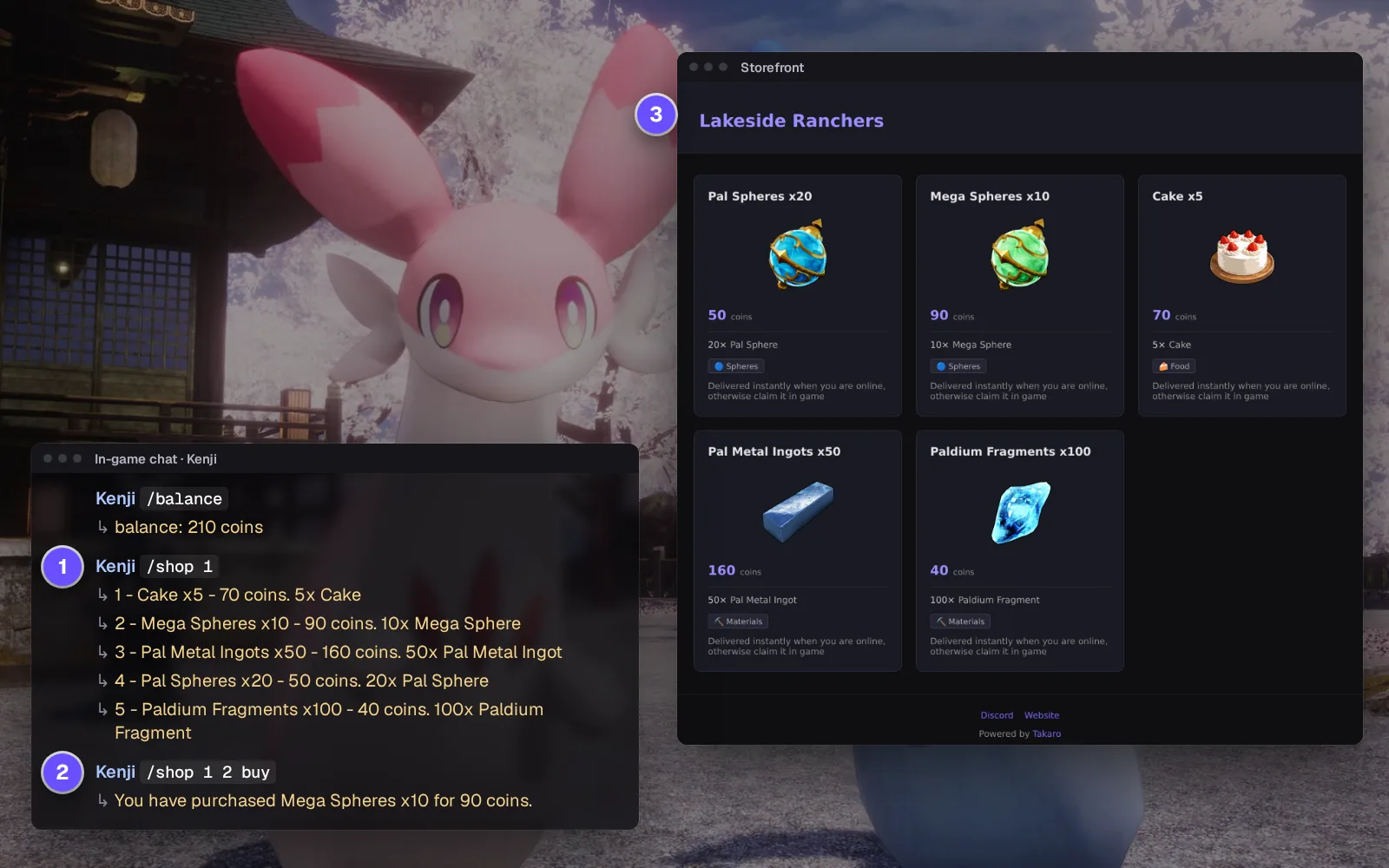
Everything else for your Palworld server
What the community connector gives you on Palworld. Install, configure, done.
Timed bans that lift themselves
Palworld only has permanent bans. Takaro remembers the end date and unbans the player when it passes.
The console, from the browser
Run players, metrics, save and announce without logging in as admin in game.
Warn everyone before you stop the server
Send a message to everyone in game before you shut down, so nobody loses a capture mid-fight. Your host or start script brings the server back.
Run Palworld from the same login as your other servers
One dashboard, one player profile across your servers, one Discord link. If Palworld pulled players off your ARK: Survival Evolved server, both sit in one place.
How Palworld support works
Palworld is supported through Takaro's generic connector rather than one Takaro builds and releases, so there is no download here. Setup and support come from the community that maintains it.
- Maintained by the Takaro community.
- Enable the REST API on your dedicated server, run the community-built Palworld bridge as a separate program next to it (it needs Node.js), add its optional chat mod for chat and deaths (Windows servers only), then connect it with the registration token from your dashboard.
- Questions go to the community, not to Takaro support.
Connect your Palworld server
No complicated setup. No server-side installs.
Add your Palworld server
Turn on the REST API, run the community bridge next to your Palworld server, add its optional chat mod for chat and deaths (Windows servers only), and paste in the registration token from Takaro.
Install modules
Browse the module library and toggle on what you need: economy, teleports, moderation.
Manage from anywhere
The dashboard works in any browser. Check activity, adjust settings and moderate from your phone.
Free to start. Upgrade when you grow.
The free tier includes one server with all modules, full API access, and Discord integration. Paid plans start at €7.99/month.
Palworld server management FAQ
What admin commands does a Palworld dedicated server have?
Log in with /AdminPassword, then the ones you'll use most are /ShowPlayers, /KickPlayer, /BanPlayer and /Broadcast. The official REST API does much of the same from outside the game.
How do I ban a player on my Palworld server?
Run /ShowPlayers to get their ID, then /BanPlayer with that ID. The hard part is knowing who to ban once they've logged off; Takaro's session history shows who was on and when.
Why does my Palworld server need regular restarts?
Memory use climbs the longer it runs, so hosts suggest restarting anywhere from every few hours to once a day. Run /Save first and warn players; Takaro can send that warning in game.
Can I use Takaro as a Palworld admin panel on a rented server?
Only if your host lets you run an extra program next to the game server and enable the REST API, and many don't. On your own machine or a rented VPS it's straightforward.
Do my Palworld players need to install anything?
No. The bridge lives on the server side, so everyone keeps playing on the game they already have.
Does Takaro show Palworld players on a live map?
No. Takaro doesn't offer a Palworld player map, and the community integration has no documented map support. Session history tells you who was online.
Can I manage multiple Palworld servers from one dashboard?
Yes. Add as many servers as your plan allows. The free tier includes one server; paid plans cover two to eight, all from a single dashboard.
Is Takaro a replacement for my server host?
No. Takaro is a management layer on top of the server you already run. You keep your hosting provider; Takaro connects to the server and adds economy, teleports, moderation and analytics.
Can I write custom modules?
Yes. Takaro modules are commands, hooks and cron jobs you can write yourself, and the REST API is open for anything a module cannot reach.
How much does it cost?
The free tier covers one server with every module included. Paid plans start at €7.99/month for two servers. See all plans.
What does the Palworld connector actually cover?
Player tracking, automated server events, Discord integration, automated actions and activity monitoring. See the full feature list.
Where do I get help with Palworld support?
In the Takaro Discord, where the people who build and run the community connectors are.
Is Palworld support official?
No. Palworld is supported through Takaro's generic connector rather than a connector Takaro builds and releases, so setup and support come from the community. How community support works.
Ready to manage your Palworld server?
Connect your server and start adding features in minutes.
Running more than one game?
One Takaro account runs every game below, with one player profile across all of them.