
Minecraft server admin tools that show where the diamonds went
Pick any member of your SMP and replay their evening on your overworld map: where they walked, what they killed, whose base they stood in and what turned up in their inventory while they were there. Your block logger says which chest was opened; this shows who left with the stack.
Java Edition: Fabric, Paper and NeoForge. Runs next to your block logger.
- Free for one server, with every module
- One jar per loader on the server. Players join with the vanilla client
- Inventory changes arrive as they happen, not on the next poll
Tickets every SMP admin knows
"Someone emptied my chest"
The container log names the member who opened it at 1:40 AM. It can't say where the stack went or who was standing outside while it happened.
With Takaro Draw a box around the base for those hours and read the Theft tab: who was inside and what landed in their inventory there.
"I need someone to ban griefers tonight, but I'm not opping them"
Op is all or nothing. Hand it to a moderator for one evening and they can also change the gamerules, give themselves anything and stop the server.
With Takaro Give them a Takaro role with kick and ban only. Timed and permanent bans land in the server's own ban list.
"New version's out, when are we updating?"
Fabric moves fast, and every server-side mod you rely on has to catch up before the server can move.
With Takaro Takaro ships one jar per Minecraft version and loader, and refuses to connect to a build it wasn't made for instead of half-working.
Who walked off with the diamonds
Mark the member's base on the Tracker, the map's history view, and pick the night. Area search lists every member seen inside with the first and last time; the Theft tab lists what they gained while in there, here 23 Diamonds, an Elytra and 2 Shulker Boxes. It's strong evidence, not proof: a friend could have handed them over, and positions are samples, not a recording.
How area search and Theft work →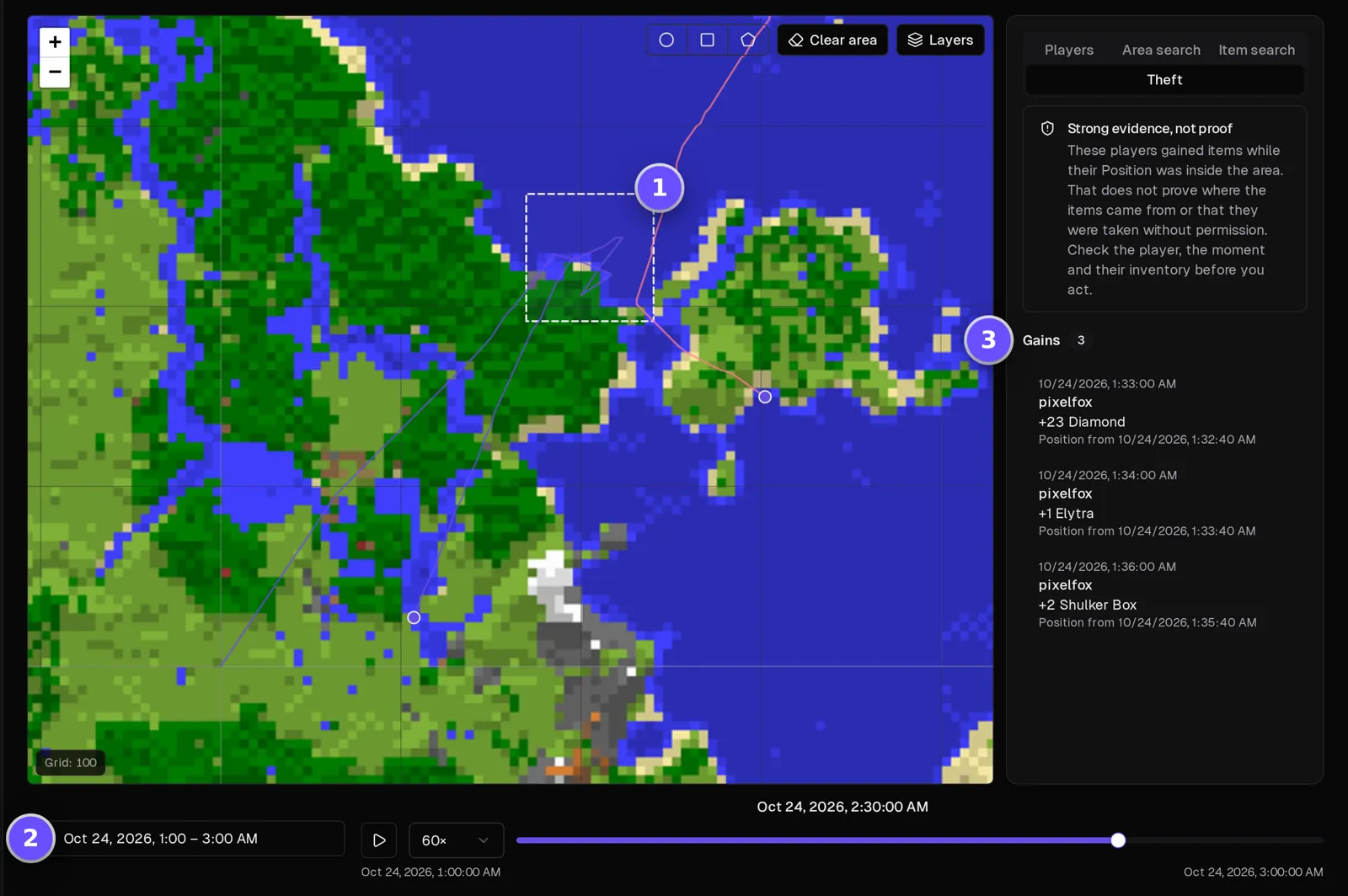
One member's evening, top to bottom
Filter the server's events to one player: when they joined, what they said, which mobs they killed and with what, what they bought from the server shop and when they left. Together with the trail on the map, it's the context your block logger doesn't have.
How the Tracker works →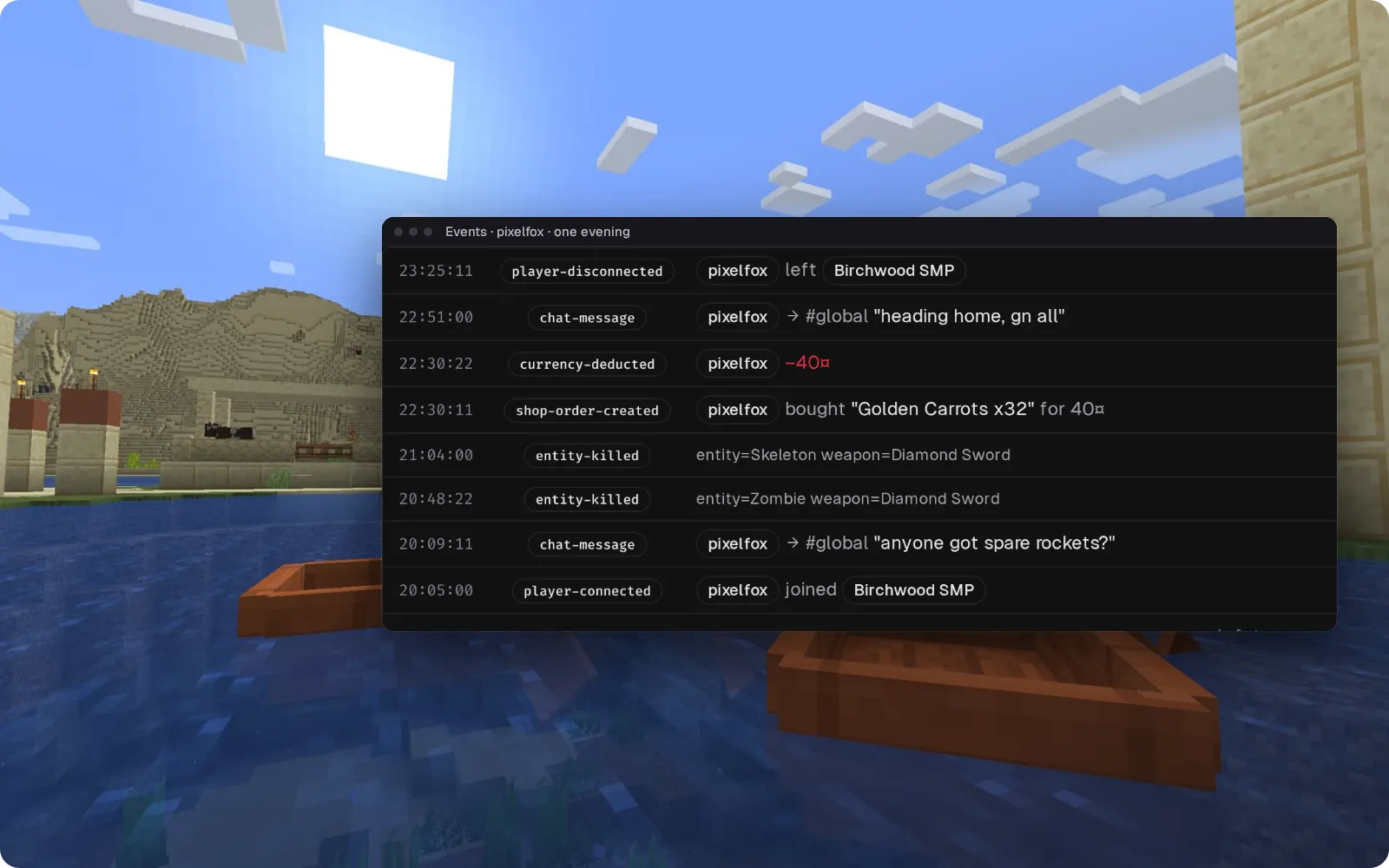
Server chat in your Discord
Game chat, joins and leaves land in a Discord channel you pick, so the members who aren't online still see what's going on. It's one way for now: messages typed in Discord aren't confirmed to reach the game yet.
Set up the Discord bridge →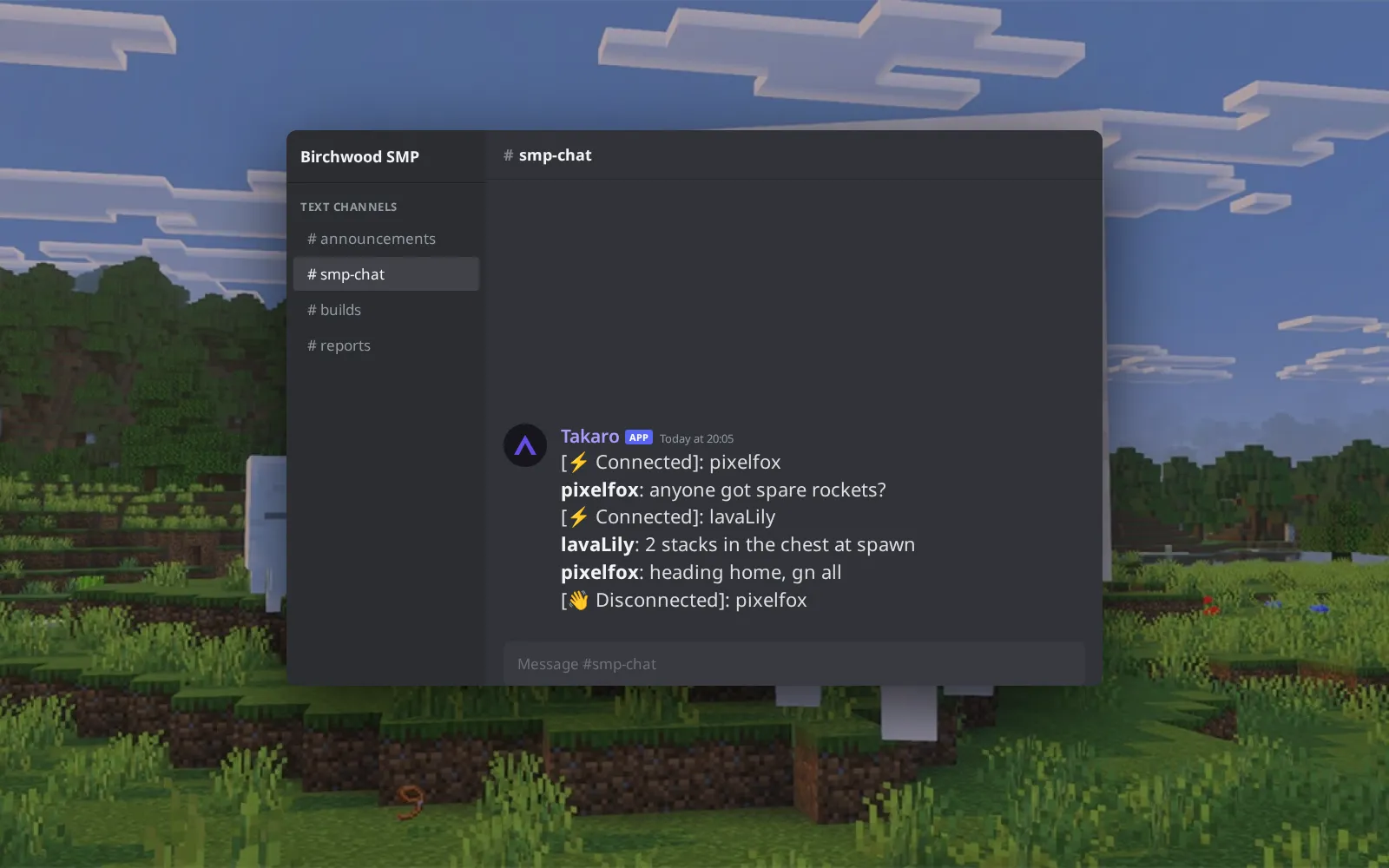
Daily streaks, spent in a chat shop
Members earn your server's currency with @daily streaks, and you set the listings and prices in Takaro. (1) @shop 1 lists food, blocks and tools. (2) @shop 1 4 buy puts 32 Golden Carrots in their inventory, in default condition like every item Takaro hands out. (3) Your storefront page shows the same food, blocks and tools as cards.
Browse the economy modules →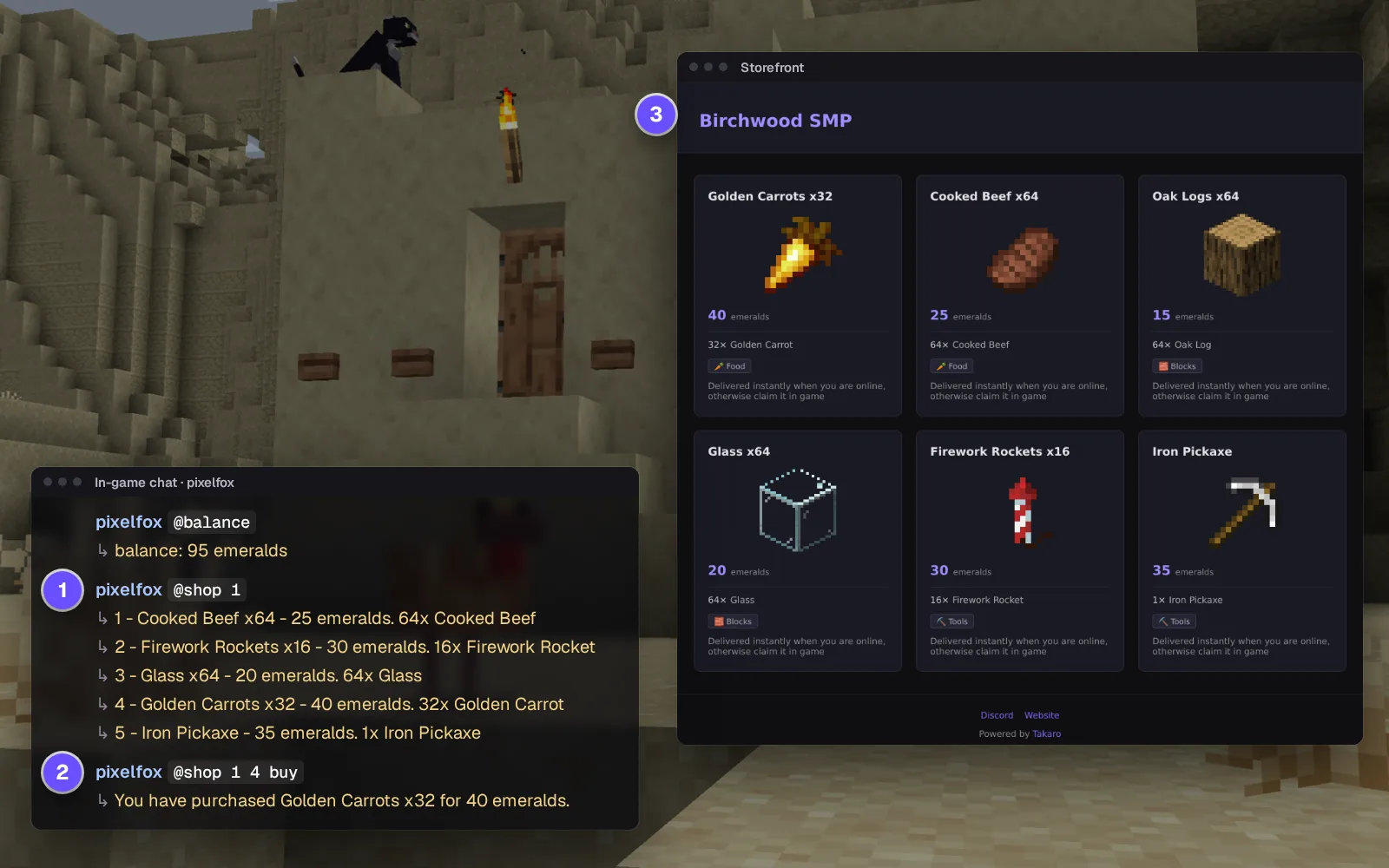
Everything else for your Minecraft server
Check a pocket before you ban
Select a member on the Tracker and see their inventory at any moment, plus every change in the range, each with where they stood.
Daily rewards and a chat shop
Pay a streak bonus when members claim it with @daily, and sell plain items for server currency with @shop. Shop items arrive in default condition, without enchantments.
Hand back a lost item
Give any item by name, straight into the player's inventory. It arrives undamaged and unenchanted, so it suits a lost stack better than a lost Mending pickaxe.
Get them off the roof
Send a stuck player to any X and Z from the browser. They land on the ground at that spot, not at the Y you typed.
Download the Minecraft connector
One mod for Paper, Fabric and NeoForge servers.
Before you start
- Takaro registration token
Latest release
Next steps
- Create the server in the Takaro dashboard and copy its registration token.
- Drop the jar for your server into the mods or plugins folder, start the server, and paste the code Takaro gives you into the mod's config file.
Free to start. Upgrade when you grow.
The free tier includes one server with all modules, full API access, and Discord integration. Paid plans start at €7.99/month.
Minecraft server management FAQ
How do I find out who stole from a chest on my Minecraft server?
Keep your block logger for which chest was opened. In Takaro, draw a box around the base on the Tracker and open the Theft tab: it lists who was inside and what they gained there. Treat it as a lead to check against the logger, not as proof.
Does it work on a Fabric, Paper or NeoForge server?
Yes, with one jar for each. Fabric is the proven platform (verified on 26.2; jars also ship for 26.1.2 and 26.3); the Paper and NeoForge jars for 1.21.11 ship but haven't had a full end-to-end test yet.
How do I let moderators ban players without giving them op?
Create a role in Takaro with the permissions you want, for example kick and ban, and assign it to your moderators. They act from the browser, and the bans land in the server's ban list.
Can I see where a player was last night on my Minecraft server?
Yes. Turn the map on in the mod's config and the Map page shows your overworld with online players; the Tracker replays recent evenings, trail by trail.
Does it replace my block logger or my web map?
No. Takaro records positions and inventory changes, not blocks, and its map is a staff tool, not a public build map. Run it next to both.
Does it work with Bedrock?
No. The connector is for Java Edition servers only.
Do players need a mod or resource pack?
No. The jar runs on the server; members join with the vanilla client for that version. If your group also builds in Terraria, it sits in the same dashboard.
Can I manage multiple Minecraft servers from one dashboard?
Yes. Add as many servers as your plan allows. The free tier includes one server; paid plans cover two to eight, all from a single dashboard.
Is Takaro a replacement for my server host?
No. Takaro is a management layer on top of the server you already run. You keep your hosting provider; Takaro connects to the server and adds economy, teleports, moderation and analytics.
Can I write custom modules?
Yes. Takaro modules are commands, hooks and cron jobs you can write yourself, and the REST API is open for anything a module cannot reach.
How much does it cost?
The free tier covers one server with every module included. Paid plans start at €7.99/month for two servers. See all plans.
Is Minecraft support official?
Yes. Takaro builds, tests and releases this connector itself, with versioned releases and a documented install. Bugs go to the connectors repository.
Latest about Minecraft
All Minecraft posts →- Takaro 2.1: see who was there, and what they took Takaro 2.1 adds the Tracker to your server's Map: replay where players went, search an area for who was inside and see what they picked up.
- How to Set Up Cross-Server Teleports in Takaro Step-by-step guide to setting up teleport modules across your game servers. Works for Rust, 7D2D, and Minecraft.
Ready to manage your Minecraft server?
Install the connector, connect, and start adding features in minutes.
Running more than one game?
One Takaro account runs every game below, with one player profile across all of them.